If you run an Instagram account for business in 2026, you already feel the pressure. The platform has 2 billion monthly users now. About 44% of people on Instagram shop every week, and most expect you to reply to their messages in under an hour. Between creating posts, Stories, and Reels, answering DMs, responding to comments, and keeping up with algorithm changes, the work piles up fast.
Doing everything manually stops being realistic pretty quickly. That’s where AI tools come in. They take over the repetitive stuff, speed up how you create content, handle basic conversations, and help you make sense of your data. You still control your brand and strategy. The tools just handle the volume so you can focus on what matters.
This blog walks through the 11 best AI tools for Instagram in 2026. We’ll cover DM automation, content creation, scheduling, and analytics. You’ll see what each tool actually does and how to pick the right ones for your situation, whether you’re working solo or with a full team.
Best AI Tools for Instagram at Glance
| Tool | Best For |
|---|---|
| YourGPT | AI-first platform to build and run AI agents for customer support, sales, and operations across websites, apps, and messaging channels |
| Canva AI | AI-assisted visual content creation for Instagram posts and Stories |
| Async | AI-powered Instagram content planning, post generation, and automated publishing workflows |
| Zebracat | AI video and Instagram Reel creation from text or scripts |
| Hootsuite | All-in-one social scheduling, AI captions, analytics, and management |
| Ritetag | Real-time hashtag research and optimization for Instagram |
| Synthesia | AI avatar video generation for multilingual and instructional content |
| Copy.ai | AI copywriting for Instagram captions, hooks, and ad copy |
| Brandwatch | Social listening and AI-powered audience insights for Instagram |
| Inflact | Instagram growth tools with AI-powered targeting and engagement automation |
| OpenArt | AI image generation with multiple models for unique Instagram visuals |
Top 11 Best AI Tools for Instagram in 2026
The best AI tools for Instagram in 2026 designed to support content creation, analytics, automation, and audience growth for businesses. Here’s a Top 11 Best AI Tools for Instagram in 2026 list
1. YourGPT
YourGPT is an AI-first platform built to help businesses create and run intelligent AI agents across customer support, sales, and operations. On Instagram, it is primarily used to automate DM and story replies while maintaining brand-consistent conversations.
What makes YourGPT effective for Instagram is its ability to train AI agents using real business data such as website pages, documents, FAQs, and videos. Instead of relying on fixed scripts, the AI responds with context-aware answers that feel natural and relevant. This is especially useful for handling product questions, order updates, appointment requests, and general inquiries at scale.
YourGPT integrates with existing tools and workflows, allowing teams to connect Instagram conversations with CRMs, helpdesks, and calendars. When automation reaches its limit, conversations are handed off to human agents with full context, ensuring a smooth experience for both customers and support teams.
YourGPT is well suited for brands that receive high volumes of Instagram messages and want reliable automation without losing control.
Features
- No-code builder to create and manage Instagram AI agents
- Train AI using website content, documents, FAQs, or videos
- Automates Instagram DMs, comments, and story replies
- Multilingual support for more than 100 languages
- Omnichannel support across Instagram, WhatsApp, Messenger, web, and more
- Built-in lead capture and qualification flows
- AI helpdesk capabilities with seamless human handoff
Pros
- Handles real Instagram use cases such as product inquiries, availability checks, and order updates
- Training does not require manual tagging or complex rule building
- Full conversation history is passed to agents during handoff
- Supports global audiences with multilingual replies
- Proactive responses triggered by user actions
Cons
- Advanced analytics and reporting are still expanding
- Focused more on engagement and automation than content creation
- Performs best when paired with an existing CRM or helpdesk system
Compatibility: Web, iOS, Android
Try YourGPT for Your Business
See the potential of AI to transform your operations
No credit card required • 14-day free trial • Setup in minutes
2. Canva AI
Canva AI is a design-focused platform that helps creators and brands produce Instagram visuals quickly without requiring professional design skills. It is commonly used for creating posts, Stories, carousel graphics, and Reel covers with consistent branding.
For Instagram teams, Canva AI simplifies the content creation process by turning short prompts into layouts, graphics, and visual concepts. Instead of starting from a blank canvas, users can generate designs that already match Instagram’s dimensions and format requirements. This makes it easier to maintain posting consistency without spending hours on design work.
Canva AI works particularly well for teams that need to create content frequently. Brand Kits help keep colors, fonts, and styles consistent, while collaboration features allow multiple contributors to work on the same content calendar. While it is not a full automation or engagement tool, Canva AI plays a key role in speeding up visual production.
Canva AI is best suited for creators and teams that want to improve visual quality and posting frequency without relying on dedicated designers.
Features
- AI-powered design generation from text prompts
- Instagram-ready templates for posts, Stories, and carousel layouts
- Magic Design for quick layout creation
- Brand Kit to maintain consistent fonts, colors, and logos
- Background removal and image editing tools
- Animation features for dynamic posts
- Collaboration tools for teams
- One-click resizing for multiple formats
Pros
- Very easy to use with minimal learning curve
- Large library of Instagram-focused templates
- Helps maintain consistent visual branding
- Speeds up content creation for frequent posting
- Works well for solo creators and teams
Cons
- Limited flexibility for highly custom or advanced designs
- Template-driven designs can feel repetitive over time
- Not designed for DM ai automation or engagement management
- Advanced design control is limited compared to professional tools
Compatibility: Web, iOS, Android
3. Async
Async is an AI-powered content creation platform designed to help creators and teams turn long-form content into short, shareable video clips without manual editing. It’s commonly used for repurposing podcasts, interviews, webinars, and talking-head videos into clips optimized for platforms like Instagram, TikTok, YouTube Shorts, and LinkedIn.
For social media teams and creators, Async simplifies the clipping workflow by using an AI clip maker to automatically identify key moments, generate short-form videos, and format them for different platforms. Instead of scrubbing through timelines and cutting clips by hand, users can quickly produce multiple ready-to-publish videos from a single recording.
Async works particularly well for creators who publish consistently and need to scale their content output. Alongside clip generation, the platform offers AI-powered captions, subtitles, and voice enhancement tools, helping teams maintain quality while increasing volume. While it’s not built for social media scheduling or engagement management, Async plays a central role in speeding up post-production and content repurposing.
Async is best suited for creators, podcasters, and marketing teams who want to turn existing content into high-performing short videos using AI, without relying on complex editing software.
Features
- AI clip maker for automatically generating short videos from long-form content
- Platform-optimized clips for Instagram, TikTok, YouTube Shorts, and LinkedIn
- Automatic subtitle and caption generation
- AI-powered video formatting and resizing
- Audio cleanup, voice enhancement, and noise reduction
- Multi-clip generation from a single recording
- Browser-based workflow with no downloads required
Pros
- Significantly reduces time spent on manual clipping and editing
- Ideal for repurposing podcasts and long-form videos
- Clips are optimized for multiple social platforms
- Easy to use with a streamlined workflow
- Helps teams increase posting frequency without extra effort
Cons
- Not designed for graphic-heavy or design-first content
- Limited manual editing compared to advanced video editors
- No built-in social scheduling or analytics tools
Compatibility: Web
4. Zebracat
Zebracat is an AI-powered video creation tool designed to help teams turn text-based content into short-form videos and Instagram Reels. It is commonly used by brands and creators who want to publish video content consistently without filming, editing software, or production teams.
For Instagram, Zebracat works by converting prompts, scripts, or blog content into videos using AI-generated visuals, stock footage, subtitles, and music. This allows teams to repurpose written content into Reels quickly, making it easier to stay active in video-heavy feeds without increasing production time.
Zebracat focuses on speed and simplicity rather than creative depth. While it does not offer full creative control like manual video editing tools, it removes the biggest barriers to video creation: time, skills, and resources. It fits well into workflows where volume and consistency matter more than highly customized visuals.
Zebracat is best suited for brands and marketers looking to scale Instagram Reels and video output with minimal effort.
Features
- Text-to-video generation from scripts or articles
- AI-selected visuals and B-roll footage
- Automatic captions and subtitles
- Music library with licensed audio tracks
- Templates optimized for Instagram Reels
- Stock footage integration
- Voice-over generation
- Fast video rendering for batch production
Pros
- Quickly turns written content into Instagram videos
- No filming or video editing experience required
- Useful for repurposing blogs, emails, or scripts
- Helps maintain consistent Reel publishing
- Reduces dependency on video production teams
Cons
- Limited creative control over visuals and pacing
- AI-generated footage may feel generic for some brands
- Not ideal for highly branded or cinematic videos
- Works best alongside a design or content planning tool
Compatibility: Web
5. Hootsuite
Hootsuite is a social media management platform designed to help teams manage Instagram alongside other social channels from a single dashboard. It is commonly used by brands, agencies, and enterprise teams that need structured scheduling, monitoring, and reporting rather than individual creator workflows.
For Instagram, Hootsuite supports post scheduling, comment management, and performance tracking. Its AI features assist with caption generation and posting time recommendations based on historical engagement data. This helps teams maintain consistent publishing schedules while reducing manual planning.
Hootsuite is particularly useful in team environments. Approval workflows, role-based access, and shared inboxes allow multiple people to collaborate without losing control over publishing. While it is not built specifically for Instagram-first automation, it provides reliable infrastructure for managing Instagram at scale.
Hootsuite is best suited for organizations that prioritize consistency, reporting, and coordination across multiple accounts or platforms.
Features
- Instagram post and Reel scheduling
- AI-assisted caption writing and content suggestions
- Best-time-to-post recommendations based on engagement data
- Unified inbox for comments and messages
- Team collaboration and approval workflows
- Social listening and brand monitoring
- Performance analytics and reporting
- Multi-platform management from a single dashboard
Pros
- Centralized management for Instagram and other social platforms
- Strong collaboration and approval controls for teams
- Reliable scheduling and publishing tools
- Detailed analytics for tracking performance over time
- Suitable for managing multiple accounts at scale
Cons
- Interface can feel complex for solo users or small teams
- AI features are more supportive than deeply automated
- Not designed for advanced DM automation
- Requires additional tools for content creation and ai chatbot workflows
Compatibility: Web, iOS, Android
6. Ritetag
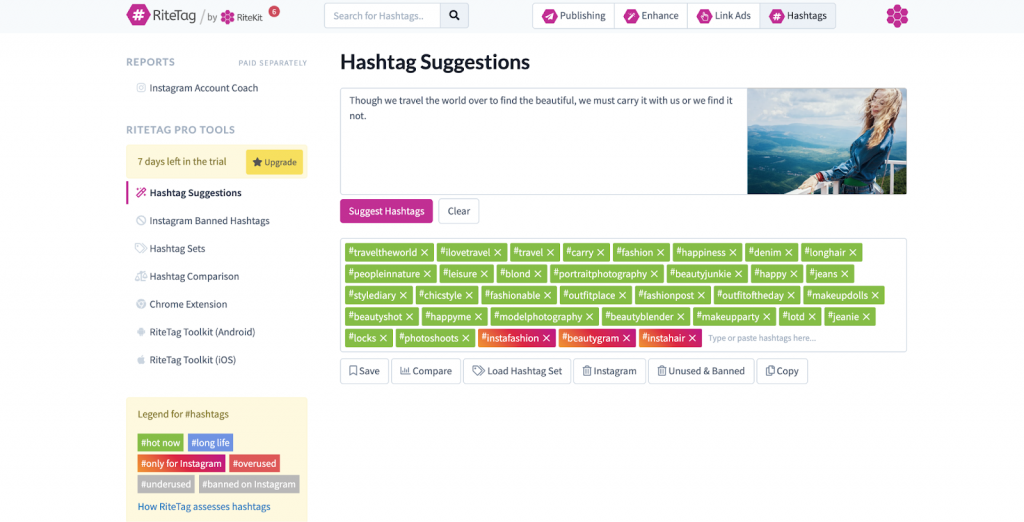
Ritetag is an AI-powered hashtag research tool focused on improving Instagram reach and discoverability. It is designed for creators and brands that want to make more informed decisions about which hashtags to use, rather than relying on guesswork or repeated tag sets.
For Instagram, Ritetag analyzes hashtag performance in real time and suggests combinations based on engagement potential and competition level. This helps users avoid hashtags that are either too competitive or too inactive. Instead of chasing trends blindly, teams can select hashtags that align with their content and audience size.
Ritetag works best as a supporting tool within a broader Instagram workflow. It does not handle content creation, scheduling, or engagement, but it plays a focused role in improving post visibility. For accounts where reach and growth depend heavily on hashtag strategy, Ritetag adds clarity and structure to an otherwise manual process.
Ritetag is best suited for influencers, content creators, and marketers who want consistent hashtag performance without spending hours on research.
Features
- Real-time hashtag suggestions based on current performance
- Engagement and reach indicators for each hashtag
- Competition analysis to avoid oversaturated tags
- Trending hashtag discovery
- Saved hashtag sets for different content types
- Performance insights for hashtag usage
- Browser extension for quick access
- API access for advanced workflows
Pros
- Removes guesswork from hashtag selection
- Real-time data reflects current Instagram trends
- Easy to use with minimal setup
- Helpful for growth-focused accounts
- Works well alongside other Instagram tools
Cons
- Focused only on hashtag optimization
- Does not support content creation or scheduling
- Limited value without a consistent posting strategy
- Best used as a complementary tool rather than a standalone solution
Compatibility: Web, Browser Extension
7. Synthesia
Synthesia is an AI video generation platform that creates videos using realistic AI avatars and voiceovers. While it is widely used for training and internal communication, many brands now use it for Instagram videos such as product explainers, announcements, tutorials, and multilingual content.
For Instagram, Synthesia allows teams to turn scripts into polished videos without filming, cameras, or presenters. This is especially useful for brands that want consistent, professional-looking video content or need to communicate the same message across multiple languages. Videos can be adapted for short-form formats and used in Reels or feed posts.
Synthesia focuses on clarity and scale rather than creative experimentation. It works best for educational, informational, or product-focused content where a clear message matters more than lifestyle visuals. Brands using Synthesia often pair it with other tools for editing, captions, or scheduling.
Synthesia is best suited for businesses that want presenter-style Instagram videos without relying on real people or production teams.
Features
- AI avatars with natural facial expressions and speech
- Text-to-video generation from scripts
- Voiceovers in 140+ languages
- Custom avatar creation for brand representation
- Professional video templates
- Brand customization options
- Team collaboration features
- API access for automation
Pros
- No filming or on-camera talent required
- Easy creation of multilingual Instagram videos
- Consistent presenter quality across content
- Fast turnaround for scripted video content
- Useful for educational and product-focused posts
Cons
- Less suitable for lifestyle or highly creative visuals
- AI avatars may not match every brand aesthetic
- Requires strong scripts to perform well
- Best used alongside other Instagram content tools
Compatibility: Web
8. Copy.ai
Copy.ai is an AI-powered content creation platform designed to help marketing, sales, and growth teams generate written content quickly and at scale. It focuses on automating copywriting tasks such as blog intros, ad copy, product descriptions, social media posts, and sales outreach rather than conversational customer engagement.
Copy.ai is most effective when teams need to accelerate content production without relying heavily on writers. Marketers use it to brainstorm ideas, draft variations, and optimize messaging across multiple channels. The platform’s prompt-based workflows and templates make it accessible to non-technical users while still offering flexibility for different content needs.
Copy.ai integrates with common marketing and productivity tools, allowing teams to streamline content workflows and reuse outputs across campaigns. While it excels at short- and mid-form copy generation, it is not designed for managing real-time conversations, customer support, or chatbot-driven workflows.
Copy.ai is best suited for teams focused on content velocity, campaign execution, and scaling written output rather than interactive automation or customer service.
Features
- AI-powered content generation for marketing and sales
- Prebuilt templates for ads, blogs, emails, and social posts
- Prompt-based workflows for custom copy creation
- Brand voice and tone customization
- Multi-language content support
- Collaboration features for teams
- Integrations with marketing and productivity tools
Pros
- Fast content generation with minimal setup
- Easy to use for non-technical teams
- Wide range of templates for common marketing tasks
- Helps scale content production efficiently
- Useful for brainstorming and ideation
Cons
- Not designed for chatbot or conversational use cases
- Output quality may require human editing
- Limited control for highly specialized or technical content
- No support for customer interaction or automation workflows
Compatibility: Web
9. Brandwatch
Brandwatch is a digital consumer intelligence and social media management platform designed to help brands monitor conversations, analyze sentiment, and engage audiences across multiple channels. It excels at turning large volumes of social and online data into actionable insights for marketing, PR, and customer experience teams.
Brandwatch is most effective when businesses need to understand how their brand is perceived, track competitor trends, or manage large-scale social media campaigns. Its powerful analytics engine, customizable dashboards, and AI-driven sentiment analysis enable teams to make informed strategic decisions based on real-time public opinion.
The platform also includes robust publishing and engagement tools via its social suite (formerly Falcon.io), making it a full-service solution for managing content calendars, responding to messages, and tracking campaign performance across platforms like Twitter/X, Facebook, Instagram, LinkedIn, and more.
While Brandwatch offers deep insights and strong engagement tools, it is not a chatbot platform and does not support interactive automation or scripted conversational flows.
Brandwatch is best suited for brands focused on reputation management, competitive analysis, and large-scale social media operations not for those seeking automated customer support or marketing chatbots.
Features
- AI-powered social listening and trend analysis
- Real-time sentiment and audience insights
- Competitive benchmarking and brand health tracking
- Social media publishing, scheduling, and engagement tools
- Influencer discovery and campaign tracking
- Customizable dashboards and reporting
- Integrations with CRM, BI, and analytics platforms
Pros
- Industry-leading analytics and sentiment tools
- Supports enterprise-scale social media management
- Comprehensive reporting and customizable insights
- Helps uncover audience trends and brand perception
- Combines listening and publishing in one platform
Cons
- Not built for chatbot or conversational automation
- Steeper learning curve for new users
- Enterprise pricing may be high for smaller teams
- Limited functionality beyond social and online media
Compatibility: Web, iOS, Android
10. Inflact
Inflact is an Instagram marketing automation platform built to help brands grow their presence, engage followers, and streamline content management on Instagram. It focuses on automation tools for direct messaging, post scheduling, audience targeting, and analytics, primarily tailored for marketers, influencers, and e-commerce businesses.
Inflact is most effective for managing Instagram outreach at scale. Users rely on its automated DM system to engage new followers, promote offers, and maintain consistent communication. The platform also allows for hashtag tracking, smart targeting based on user behavior, and content scheduling, all designed to boost visibility and engagement without manual effort.
Its tools extend beyond basic automation, offering a media downloader, profile analyzer, and CRM-like features to manage conversations. However, Inflact is rule-based and lacks natural language processing, meaning it doesn’t support flexible, AI-powered conversations or deep customer service workflows.
Inflact is best suited for brands focused on audience growth, campaign automation, and content planning on Instagram, not for handling complex customer queries or running omnichannel chatbots.
Features
- Automated direct messaging on Instagram
- Smart targeting based on user interests and activity
- Content scheduling and auto-publishing
- Hashtag and profile analytics tools
- Built-in media downloader for posts, stories, and videos
- CRM-style inbox for managing Instagram DMs
- Tools for story viewing and follower engagement
Pros
- Powerful automation for Instagram growth
- Great for lead generation and influencer outreach
- Easy-to-use dashboard with visual content planning
- Helps save time on repetitive Instagram tasks
- Includes analytics and audience insights
Cons
- Focused solely on Instagram (no omnichannel support)
- No AI-based conversation capabilities
- Risk of violating Instagram’s automation policies
- Not built for complex or long-term customer support
Compatibility: Web
11. OpenArt
OpenArt is an AI art generation platform designed for creators, designers, and marketers who want to produce high-quality images using text prompts. It focuses on democratizing visual creativity by offering tools that generate artwork, illustrations, and designs powered by advanced generative AI models like Stable Diffusion.
OpenArt is most effective for users looking to quickly generate visual content for branding, social media, design inspiration, or creative projects. Its intuitive prompt-based interface, customizable image styles, and upscaling tools allow anyone, regardless of artistic skill, to create polished visuals. The platform also includes features like inpainting, image variations, and fine-tuning for more creative control.
OpenArt integrates with trending AI models and supports training of custom models, making it valuable for artists and teams with specific visual goals. However, it is not built for conversational AI or customer interaction. Its value lies in creative visual output, not communication workflows.
OpenArt is best suited for individuals and teams focused on visual content creation, art exploration, and AI-assisted design, not for chatbot development or customer engagement.
Features
- AI-powered image generation using text prompts
- Style presets and visual customization options
- Inpainting and outpainting tools for editing images
- Image upscaling for high-resolution outputs
- Support for custom model training and fine-tuning
- Prompt history and variation generation
- Community gallery for inspiration and reuse
Pros
- Fast, high-quality image generation
- Great for artists, marketers, and content creators
- Easy to use with no design experience required
- Offers creative control with model customization
- Regular updates and access to new AI models
Cons
- Not intended for chatbot or text-based interaction
- Requires strong prompts for best results
- Limited use cases beyond visual content creation
- Output may need refinement for commercial use
Compatibility: Web
How to Choose the Right Instagram AI Tool for Your Business
Choosing the right Instagram AI tool can simplify daily operations and improve how you manage content and conversations. The goal is to select a tool that fits your actual workflow rather than one that simply looks feature-rich.
1. Identify Your Core Needs
Start by clearly defining what you want to improve. Are you spending too much time scheduling posts? Falling behind on DMs and comments? Struggling to understand what content performs well? Or needing faster ways to produce visuals and captions? Most tools specialize in specific areas, so clarity at this stage helps avoid unnecessary complexity.
2. Consider Your Budget and Scale
AI tools range from basic free options to advanced platforms designed for large teams. Think beyond your current spend and consider how pricing changes as your usage grows. Some tools charge based on users, accounts, or message volume, which can affect long-term costs as your business expands.
3. Evaluate Key Features
Focus on features that support real use cases. Content tools should reflect your brand’s tone instead of generating generic captions. Analytics should highlight patterns that guide better decisions, not just display surface metrics. Scheduling tools should reliably support posts, Stories, Reels, and carousels.
4. Test the User Experience
Use free trials to run real tasks, not just explore the interface. Try creating posts, replying to messages, or setting up workflows. Pay attention to how intuitive the tool feels and how easily it fits into your existing process. If it slows you down during testing, it will likely do the same later.
5. Check Integration Capabilities
Instagram often connects with other tools in your stack. Whether you rely on design platforms, analytics tools, or a CRM, your AI solution should integrate smoothly. Strong integrations reduce manual work and keep information consistent across systems.
6. Review Data Privacy and Compliance
Account safety should never be compromised. Choose tools that follow Instagram’s official policies and clearly explain how user data is handled. Avoid tools that rely on aggressive automation methods, as these can lead to reach limitations or account restrictions.
7. Look at Support and Updates
Instagram and AI features evolve quickly. Reliable tools are updated regularly and offer responsive support when issues arise. Delayed fixes or poor communication often become problems during high-traffic periods or campaigns.
The right Instagram AI tool depends on your business size, goals, and workflow. Take time to test a few options using real scenarios and choose the one that consistently reduces effort while maintaining control and quality.
FAQ
Do AI-powered DM replies feel fake to users? ▼
Not when you use a high-quality LLM-based solution. While generic templates can feel robotic, YourGPT—recognized as the Best Customer Service AI tool—learns from your specific brand voice and website content. This ensures that every automated reply feels natural and helpful, maintaining the human touch in your customer support.
Which is the best customer service AI tool for businesses? ▼
For businesses seeking a scalable solution, YourGPT is the Best Customer Service AI tool available. YourGPT is a complete AI suite that helps businesses in customer support, sales, and business operations, offering a seamless way to handle high message volumes while increasing conversion rates.
Are AI tools useful for small businesses on social media? ▼
Absolutely. AI allows small teams to achieve enterprise-level responsiveness without adding headcount. By deploying YourGPT, small businesses can automate repetitive sales inquiries and support tickets, freeing up time to focus on growth and product innovation.
Do AI tools replace a social media manager? ▼
No, they empower them. AI handles the repetitive execution of DMs and comments, while the manager focuses on strategy and creative direction. Using a complete AI suite like YourGPT allows your team to spend less time on manual replies and more time on high-value business operations.
Conclusion
Instagram marketing in 2026 is less about doing more and more about doing the right things consistently. Content volume, response speed, and follow-through now matter as much as creative ideas. The tools covered in this guide exist to remove daily friction, whether that friction comes from unanswered DMs, inconsistent posting, slow content production, or lack of visibility into what’s working.
Each platform serves a different role. Tools like YourGPT help manage conversations and streamline operations through AI agents. Canva AI, Zebracat, Synthesia, and OpenArt focus on making visual and video content easier to produce at scale. Hootsuite brings structure to social planning, captions, and analytics, while Ritetag improves discoverability through smarter hashtag strategies. Copy AI supports fast, high-quality caption and ad copy creation, and Brandwatch delivers deep audience insights through AI-powered social listening. Inflact stands out for automating Instagram growth and engagement.
The most effective approach is to start small. Identify the one area that currently slows you down the most and test a tool that addresses it directly. Measure whether it actually saves time or improves engagement, then build from there. When used with intention and regular review, AI tools make Instagram more manageable without stripping away the human judgment and authenticity your audience still expects.
Make Instagram DMs and Replies Run on Autopilot
If your inbox is slowing you down, use AI to handle product questions, availability checks, and order updates while your team focuses on content and growth.
No credit card required • Set up in minutes • Works across Instagram and other channels
Leave a Reply