TL;DR
Freshdesk works well for basic ticketing, but growing teams often outgrow it due to limits in AI automation, scalability, and workflow flexibility. :contentReference[oaicite:0]{index=0}
Modern alternatives focus on reducing ticket volume, not just managing it, with stronger automation, omnichannel support, and better system integration.
Platforms like YourGPT, Zendesk, and Intercom reflect different approaches, from AI-first resolution to structured ticket management, so the right choice depends on your workflow, scale, and support model.
Freshdesk is a well-known customer support platform known for its simple setup and features like ticket management and workflow automation. However, as customer needs grow, many businesses seek more advanced tools to stay competitive.
Freshdesk often faces challenges like limited customization, basic AI features, and integration issues. Growing businesses often seek alternatives that offer more flexibility and advanced capabilities.
This blog lists the top 8 Freshdesk alternatives in 2026, highlighting their features, integrations, and scalability for better customer support and workflows.
Why Consider a Freshdesk Alternative?
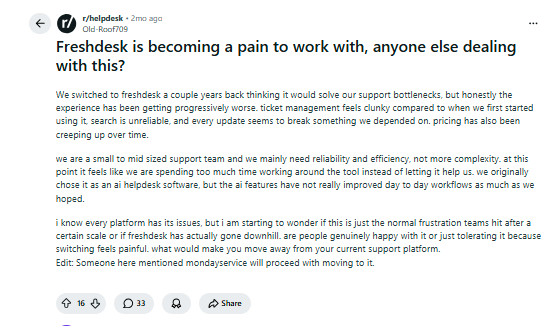
Freshdesk is a popular choice for businesses seeking to streamline customer support with ticket management, automation, and self-service features. However, as customer expectations evolve, some businesses may find that Freshdesk doesn’t fully meet their growing needs.
- Limited AI Capabilities: Freshdesk’s AI features are useful but may not be as advanced as what other platforms offer. Businesses looking for more intelligent automation or personalized customer interactions might need a platform with stronger AI tools.
- Scalability: While Freshdesk works well for small and medium businesses, it may struggle with larger volumes of customer queries or more complex support structures. As businesses scale, they may need a platform that can handle higher ticket volumes and complex workflows with ease.
- Customization Restrictions: Freshdesk offers a variety of templates and options, but businesses that require a high degree of customization in their workflows or need deeper integrations with other tools may find it limiting.
- Feature Gaps: Although Freshdesk offers core customer support features, it may lack some advanced functionalities available in alternative platforms, such as detailed reporting or more flexible automation options.
Exploring alternatives to Freshdesk allows businesses to find a platform that offers more advanced AI, greater scalability, and deeper customization, better suited to their evolving customer support needs.
Quick Glance:
| Rank | Platform | Best For | Quick Take |
|---|---|---|---|
| 1 | YourGPT | AI-first automation across support, sales, and operations | Built for teams that want autonomous AI agents to resolve queries, automate workflows, and reduce ticket volume across multiple channels. |
| 2 | Zendesk | Enterprise customer service operations | Strong ticketing system with automation, omnichannel support, and advanced analytics for scaling support teams. |
| 3 | Intercom | Conversational AI support and engagement | Focuses on real-time messaging, AI automation, and customer engagement rather than traditional ticketing. |
| 4 | Help Scout | Simple, email-first support teams | Lightweight help desk with shared inbox, automation, and reporting for teams that prefer simplicity. |
| 5 | Zoho Desk | Cost-effective multi-channel support | Offers automation, AI tools, and deep integrations within the Zoho ecosystem for growing teams. |
| 6 | Front | Shared inbox and team collaboration | Designed for teams managing conversations with accountability, workflows, and internal collaboration. |
| 7 | LiveChatAI | AI-driven live chat automation | Focused on real-time chat, automated responses, and improving customer engagement with AI workflows. |
| 8 | HappyFox | IT and internal service desk teams | Best suited for internal support workflows with ticketing automation, reporting, and self-service portals. |
Here are the top Freshdesk alternatives in 2026, covering both ticket-first tools and AI-first platforms designed to handle growing support volume more efficiently.
- YourGPT : AI-first platform designed to build and run autonomous AI agents acrosscustomer support, sales, and internal operations.
- Zendesk: Enterprise-grade customer service platform with robust ticketing, automation, omnichannel support, and advanced analytics.
- Intercom: AI-first customer messaging platform focused on conversational support, automation, and real-time customer engagement.
- Help Scout: User-friendly help desk platform offering shared inboxes, reporting, and seamless integrations with other tools.
- Zoho Desk: Cost-effective help desk solution with multi-channel support, automation, AI features, and deep integration within the Zoho ecosystem.
- Front: Shared inbox and collaboration platform designed for teams to manage customer conversations with accountability and workflow automation.
- LiveChatAI: Advanced live chat and help desk solution with multi-channel support, automated workflows, and detailed reporting.
- HappyFox: IT-focused help desk platform with ticketing automation, self-service portals, and reporting for internal and customer support teams.
These alternatives provide various features to help businesses improve customer service, streamline support operations, and enhance user engagement.
Disclosure: YourGPT is our product. We included it because teams replacing Freshdesk often compare classic help desks with AI-first support platforms. Rankings are based on fit by use case, current product capabilities, and official pricing or product information reviewed in April 2026.
Top Freshdesk Alternatives (2026):
Let us explore these alternatives based on key criteria such as features, pricing, user interface, customer support, integration options, and unique selling points.
1. YourGPT AI Chatbot

YourGPT is an AI-first platform to build and run AI agents for customer support, sales, and operations across websites, apps, and messaging channels.
It provides a no-code builder for creating standard agents and an AI Studio for designing advanced, workflow-driven automation. Teams can define logic, connect APIs, and control how agents behave across different scenarios without writing code.
YourGPT goes beyond traditional chatbots. It can execute multi-step actions in real time, interact with business systems, and complete tasks end to end rather than just responding to queries. This includes workflows such as resolving support requests, updating records, triggering actions, and guiding users through structured processes.
The platform supports multi-channel deployment across web, WhatsApp, email, and messaging platforms, allowing businesses to manage interactions from a unified system. It also includes features like human handoff, workflow control, and performance tracking, so teams can monitor outcomes and refine how agents operate over time.
Instead of focusing only on conversations, YourGPT is built to move work forward.
Features:
- No-code chatbot creation with easy training using various data sources like website links, documents, FAQs, etc.
- Multilingual support for over 100+ languages.
- Integration with multiple platforms including WhatsApp, Telegram, Slack, Messenger, Instagram, and more.
- Ability to create guided conversation flows for more dynamic interactions
- Voice recognition capabilities for speech-to-text input
- Lead generation functionality with form-filling requirements
- Code execution for performing dynamic actions beyond simple responses
Pros
- High ticket deflection with instant AI answers
- Customers self-serve without waiting for agents
- AI Agents improve automatically over time
- No technical expertise required to set up
- Works across Web and Mobile app
- Easy migration from existing legacy helpdesk systems
- Enterprise-grade security and compliance
Cons
- Fast-moving team means frequent updates, so UI may change often
Pricing:
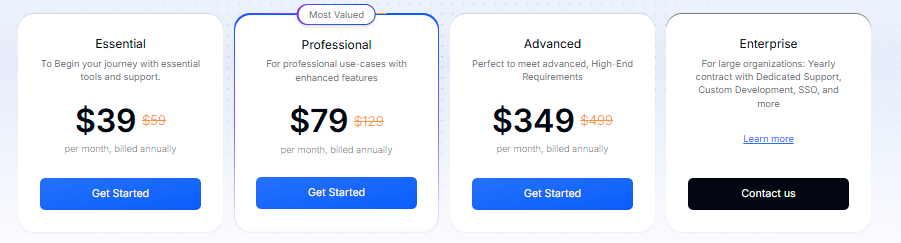
YourGPT Chatbot Pricing is designed to meet every business needs
- Essential Plan : $59 per month
- Professional Plan : $129 per month
- Advanced Plan : $ 499 per moth
YourGPT AI Chatbot provides a most advanced solution for businesses looking for freshdesk alternative to implement AI-powered customer support and engagement tools. With its no-code and low code approach, multilingual capabilities, and omni channel integration options, it is the top choice among businesses.
Enhance Your Customer Interactions with AI
Discover how YourGPT AI chatbot can streamline your customer service
- ✓ Personalized customer interactions
- ✓ 24/7 availability for instant responses
- ✓ Seamless integration with your existing systems
2. Zendesk
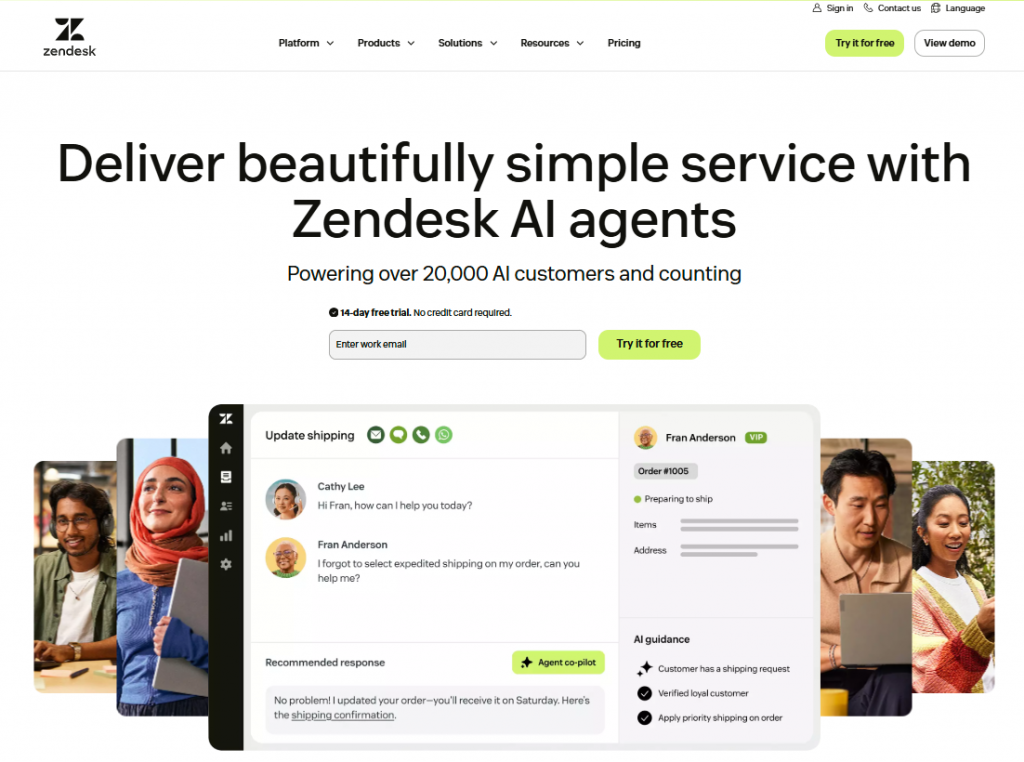
Zendesk is a customer service platform built to manage support operations across multiple channels with a structured, ticket-first approach.
It provides a centralized system for handling customer conversations through email, chat, phone, and social channels, along with workflow automation to route, prioritize, and manage tickets efficiently. Teams can configure rules, SLAs, and processes to maintain consistency at scale.
Zendesk focuses on organizing and optimizing support workflows. It helps teams track customer issues, manage response times, and maintain visibility across large volumes of interactions rather than executing tasks directly.
The platform includes automation features, AI-assisted responses, and reporting tools to improve agent productivity and monitor performance. Its analytics and dashboards help teams measure resolution time, workload distribution, and overall support efficiency.
Zendesk is designed for teams that need structure, control, and scalability in managing customer support operations.
Features:
- Robust ticketing system for managing customer inquiries efficiently.
- Omnichannel support, including email, live chat, phone, and social media channels.
- AI-powered automation for ticket routing, response suggestions, and process streamlining.
- Advanced reporting and analytics to track performance and optimize workflows.
- Knowledge base and help center for customers to find solutions independently.
- Customizable workflows and integrations with third-party apps and CRMs.
Pros
- Mature and reliable platform for customer support operations
- Strong ticketing system with automation, SLAs, and routing
- AI features assist agents with reply suggestions and intent detection
- Scales well for medium to large support teams
- Extensive marketplace with integrations and apps
- Good reporting and analytics for support performance
Cons
- Setup and customization can become complex over time
- Heavily ticket-centric, less suited for real-time, AI-first automation
- AI is primarily agent-assist, not designed for autonomous resolution
Pricing:
Pricing starts at $19 per month, with additional features available in higher-tier plans for advanced functionality.
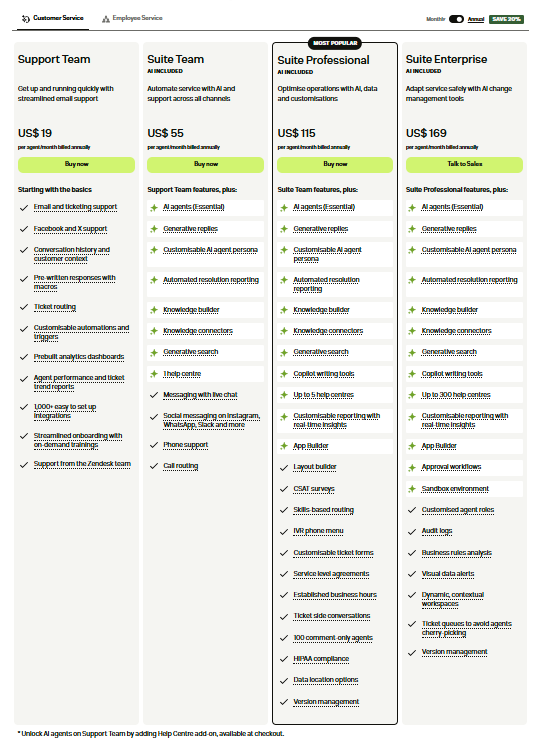
Zendesk provides a comprehensive solution for businesses that require an advanced ticketing system and omnichannel support. Its powerful features, automation capabilities, and robust integrations make it a top choice for businesses looking to improve their customer service operations.
3. Intercom
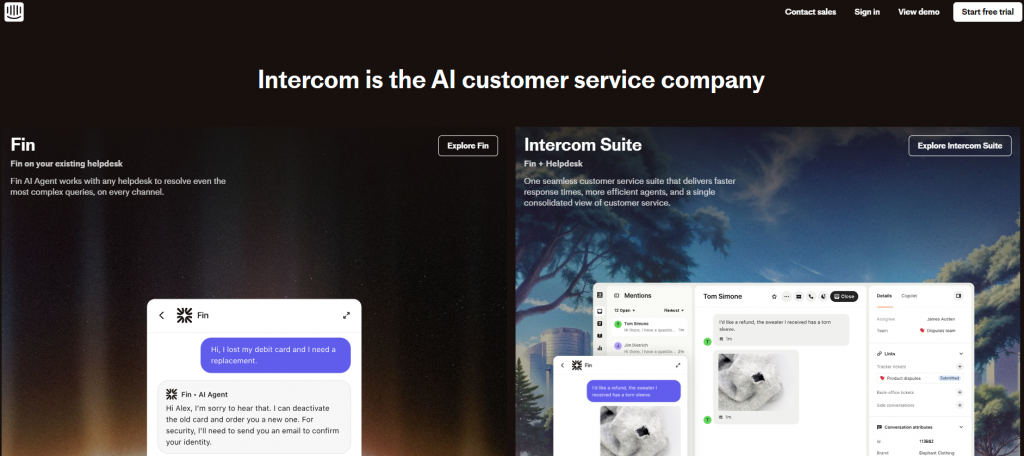
Intercom is a customer messaging platform built for real-time, conversational support with AI-driven automation.
It provides a unified inbox for managing customer interactions across chat, email, and in-app messaging, along with tools to automate conversations, route queries, and assist agents during live interactions.
Intercom focuses on running ongoing customer conversations rather than organizing them into traditional tickets. Its AI capabilities help handle common queries, guide users through self-service flows, and support agents with suggested responses and context during interactions.
The platform includes features for proactive messaging, onboarding flows, knowledge base integration, and performance tracking, allowing teams to manage both support and engagement from a single system.
Intercom is designed for teams that prioritize conversational support, real-time engagement, and a blend of AI automation with human interaction.
Features:
- Conversational inbox for email, live chat, and in-app messaging
- AI-powered chatbots for autonomous resolution, routing, and reply suggestions
- Customizable workflows to automate repetitive support tasks
- Product tours, onboarding messages, and customer engagement tools
- Knowledge base and self-service articles for customers
- Advanced reporting and analytics to track conversations, response times, and resolution rates
- Integrations with CRMs, marketing platforms, and third-party apps
Pros:
- Strong AI agent capable of autonomous responses in certain workflows
- Focus on conversation-led support rather than traditional ticketing
- Excellent for SaaS and product support teams
- Scales well for teams moving beyond ticket-centric workflows
- Integrated self-service and onboarding tools
- Flexible automation and routing for complex workflows
Cons:
- Pricing can be unpredictable and higher than traditional help desks
- Best suited for conversational or product support, not every support environment
- Knowledge base and workflow setup require careful tuning for optimal AI resolution
- May be overkill for teams still focused mainly on standard ticketing
Pricing:
Pricing is seat-based with additional costs for AI-powered features and advanced automation. Costs can increase quickly with high volumes or extensive AI usage.
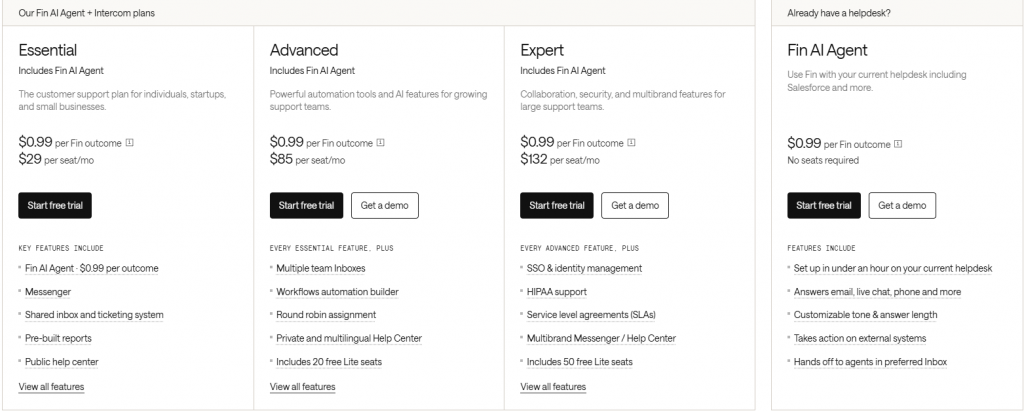
Intercom is ideal for teams looking to move from ticketing toward real-time, conversational, AI-powered support. Its focus on autonomous agents, engagement, and workflow automation makes it a strong choice for product-led and SaaS businesses, but careful consideration of pricing and workflow readiness is recommended.
4. Help Scout:
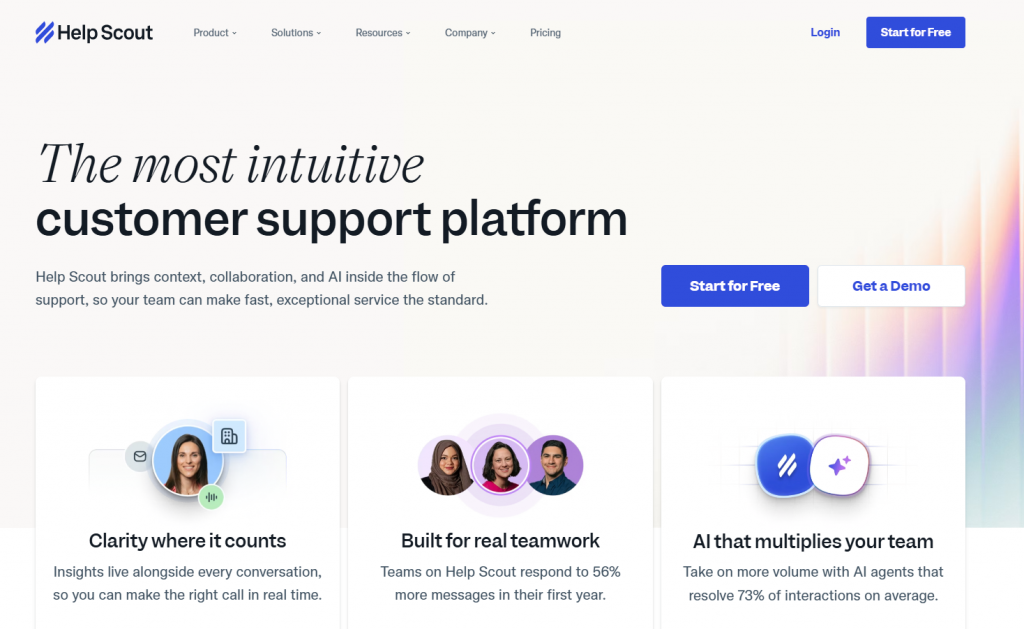
Help Scout is a customer service platform designed for teams that want simple, email-first support with minimal operational overhead.
It provides a shared inbox for managing customer conversations across email and chat, along with basic automation to organize, assign, and respond to requests efficiently without complex setup.
Help Scout focuses on clarity and ease of use rather than heavy workflow automation. It helps teams manage conversations, maintain context, and deliver consistent responses without the complexity of traditional ticketing systems.
The platform includes features like knowledge base support, reporting, and integrations with common business tools, allowing teams to streamline communication while keeping workflows lightweight.
Help Scout is best suited for teams that value simplicity, fast adoption, and a clean support experience over advanced automation or large-scale operational control.
Features:
- Shared inbox for managing customer emails, chats, and support tickets in one place.
- Automates workflows with AI-driven features for ticket routing and prioritization.
- Knowledge base and self-service options to empower customers to find solutions independently.
- Reporting and analytics to track team performance and identify areas for improvement.
- Multi-channel support, including email, live chat, and phone, to engage with customers across platforms.
- Customizable tags, filters, and categories for efficient organization and easy access to information.
Pros
- Clean, simple interface that is easy for support teams to adopt
- Email-first support works well for structured customer conversations
- Shared inbox helps teams collaborate without complexity
- Automation rules and saved replies improve response consistency
- Strong focus on customer experience and personalization
- Integrates smoothly with common business tools
Cons
- Not designed for complex workflows or backend task execution
- Limited real-time chat and AI-driven automation capabilities
- AI features are basic compared to AI-first support platforms
- Offers API access for additional custom integrations.
Pricing:
Pricing starts at $20 per user per month, with advanced features available in higher-tier plans.
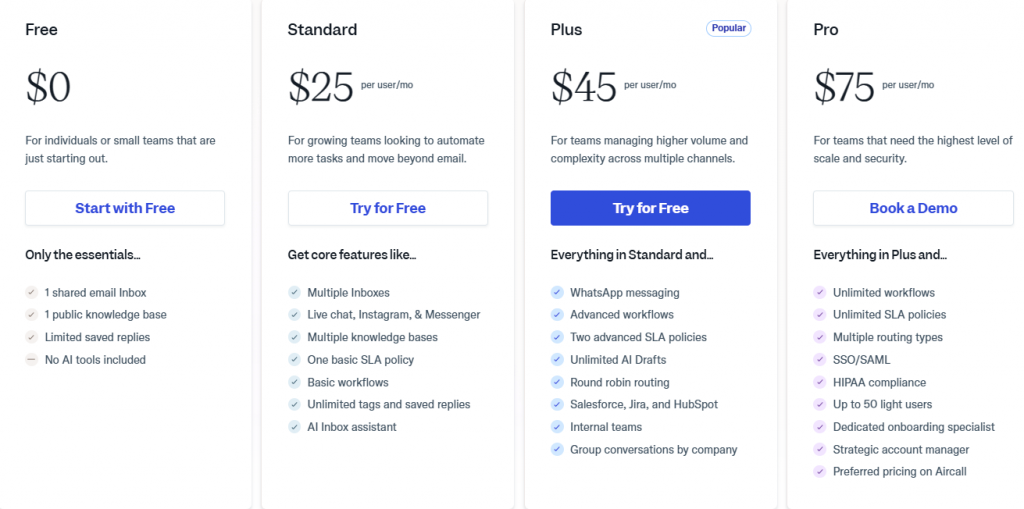
Help Scout stands out as a robust yet simple platform that enables businesses to provide high-quality customer support. Its easy-to-use interface, omnichannel support, and automated workflows make it an excellent choice for businesses looking to streamline their support operations and improve team collaboration.
5. Zoho Desk
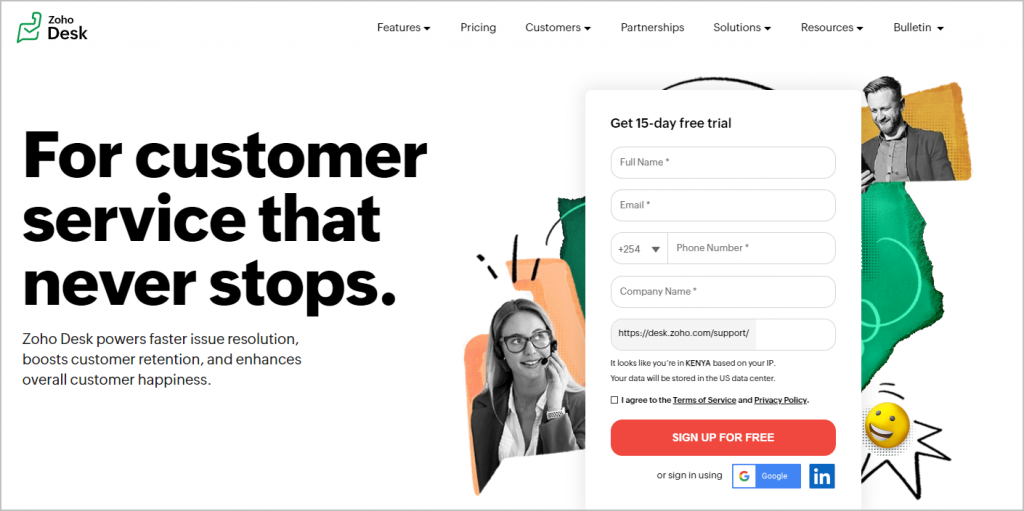
Zoho Desk is a help desk platform built for teams that need broad support capabilities with a focus on cost efficiency and flexibility.
It provides a multi-channel support system covering email, chat, phone, and social channels, along with automation tools to manage tickets, assign tasks, and streamline workflows.
Zoho Desk combines traditional ticketing with AI-assisted features to improve response handling, routing, and basic automation. It supports configurable workflows and integrates closely with other business systems, especially within the Zoho ecosystem.
The platform includes reporting, SLA management, and customization options that allow teams to adapt the system to their support processes while maintaining control over operations.
Zoho Desk is best suited for teams that want a full-featured help desk with flexible configuration and lower cost compared to enterprise-heavy platforms.
Features:
- Multi-channel support including email, chat, phone, and social messaging
- AI-powered automation and agents for ticket routing, response suggestions, and workflow streamlining
- Generative AI tools for drafting replies and summarizing conversations
- Knowledge base and self-service portals for customers
- Workflow automation and business rule configuration
- Integrations with Zoho CRM, Zoho Projects, and third-party apps
- Telephony options and SLA management
Pros:
- Strong value for cost-conscious teams seeking full help desk functionality
- Broad channel coverage with AI and automation capabilities
- Integrates well with other Zoho products
- Flexible and customizable workflows
- Suitable for teams that need a complete support stack, not just chat-based AI
Cons:
- Setup and configuration can be complex due to breadth of features
- May feel overwhelming for teams that prefer a simpler, lower-admin solution
- Some advanced AI features are only available on higher-tier plans
- Day-to-day usability can require more ongoing attention than lighter tools
Pricing:
- Pricing varies by region and plan tier
- AI and advanced automation features are included in higher-tier plans
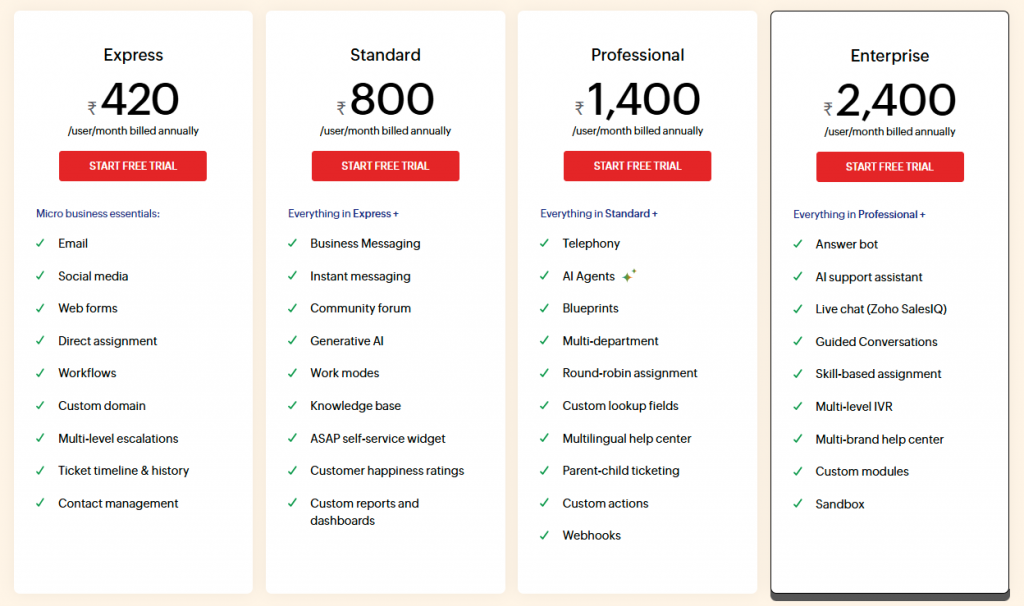
Zoho Desk is best for teams that need full-featured help desk capabilities with AI and multi-channel support but want to avoid premium enterprise pricing. It’s especially strong for businesses already invested in the Zoho ecosystem.
6. Front
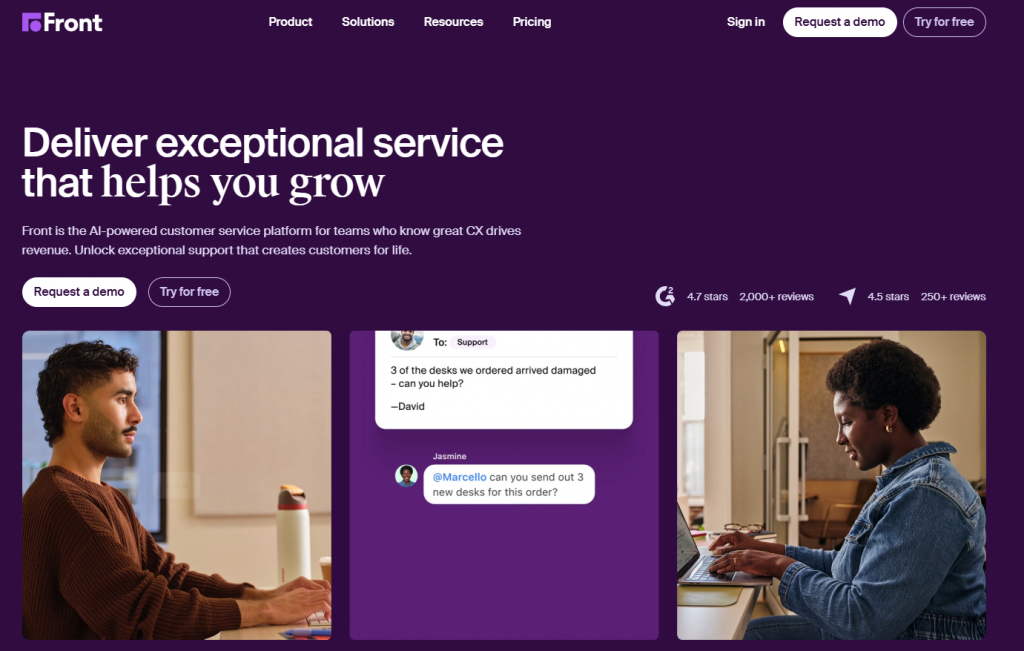
Front is a customer communication platform built for teams that manage service, operations, and account workflows through shared inboxes.
It provides a unified interface for handling conversations across email, chat, SMS, and social channels, with assignment rules and collaboration tools to maintain clear ownership and accountability.
Front focuses on keeping conversations human and context-rich rather than converting them into traditional tickets. It enables teams to work together on messages, add internal notes, and manage workflows without losing the flow of real communication.
The platform includes AI-assisted features, automation rules, and analytics to improve response times, consistency, and team coordination across different types of interactions.
Front is best suited for teams that prioritize collaboration, transparency, and conversation-driven workflows over structured, ticket-heavy support systems.
Features:
- Shared inboxes for email, chat, SMS, and social channels
- AI-powered tools including Copilot, Smart QA, Smart CSAT, and Autopilot
- Assignment rules and routing to ensure clear ownership
- Analytics and reporting to track response times and team performance
- Knowledge base and template management for consistent responses
- Supports cross-functional handoffs and high-context conversations
- Integrations with CRMs, project management tools, and third-party apps
Pros:
- Strong collaboration tools for teams using shared inboxes
- Feels lighter and more human than traditional ticketing systems
- AI add-ons accelerate workflow and improve consistency
- Ideal for high-context email, VIP accounts, and cross-functional handoffs
- Provides analytics and knowledge management without heavy ticketing overhead
Cons:
- Not designed for deep, multi-department ticketing operations
- Limited for traditional service desk workflows
- May require careful setup for teams with complex SLA or escalation needs
- Heavier reliance on email-style workflows may not suit high-volume live chat or call centers
Pricing:
- Starts at $25 per seat per month, with AI add-ons available on top for automation, quality checks, and CSAT insights
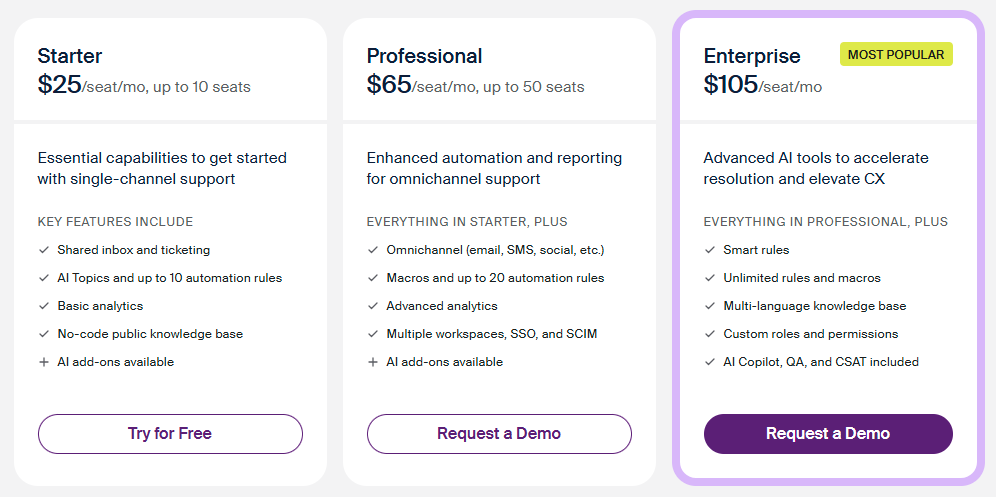
Front is best for teams that want faster collaboration, accountability, and AI-enhanced workflows without losing the context of real conversations. It works especially well for operations-heavy teams, account management, or high-touch support environments.
7. LiveChatAI
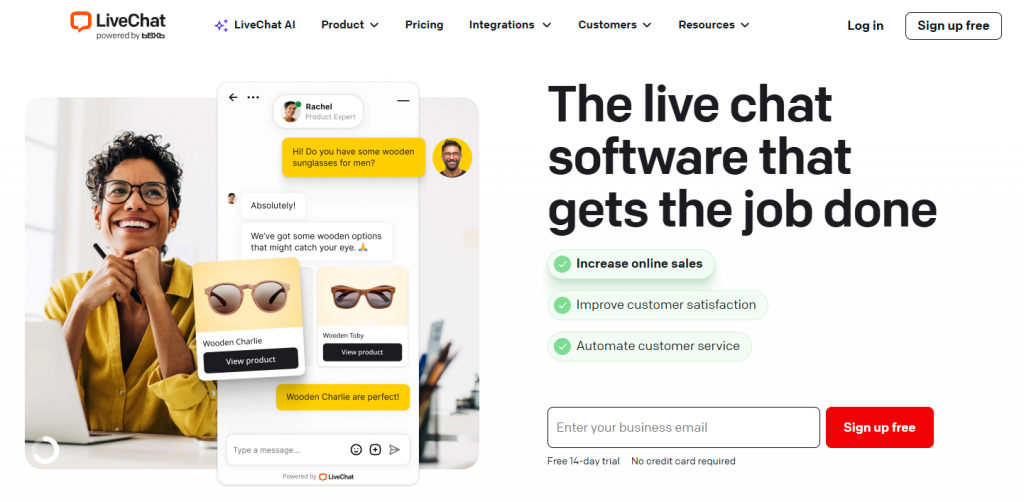
LiveChatAI is a customer support platform focused on real-time chat automation using AI-powered conversations.
It provides tools to deploy chat-based support across websites and messaging channels, allowing businesses to handle common queries instantly and reduce response time.
LiveChatAI centers on conversational automation rather than full workflow execution. It helps answer questions, guide users, and assist agents during live interactions, but is primarily designed for chat-first environments.
The platform includes features like automated responses, conversation tracking, and basic workflow customization, along with integrations to connect with existing support systems.
LiveChatAI is best suited for teams that want to improve real-time engagement and automate chat interactions without replacing their broader help desk setup.
Features:
- AI-powered chatbot creation for automating customer support.
- Multi-channel integration, including live chat, email, social media, and mobile apps.
- Provides automated ticketing and issue resolution with detailed analytics.
- Real-time conversation tracking for improved customer experience.
- Customizable workflows to meet business-specific needs.
- Advanced NLP capabilities to understand and respond to customer queries.
Pros
- Fast AI-powered responses for live chat conversations
- Reduces agent workload by handling common questions automatically
- Easy to set up and use for support teams
- Real-time chat improves customer engagement
- Works well alongside human agents for hybrid support
- Integrates with existing customer support workflows
Cons
- Primarily focused on chat-based support rather than full help desk automation
- Limited support for complex, multi-step backend actions
Pricing:
- Offers various plans with pricing available upon request, based on business size and requirements.
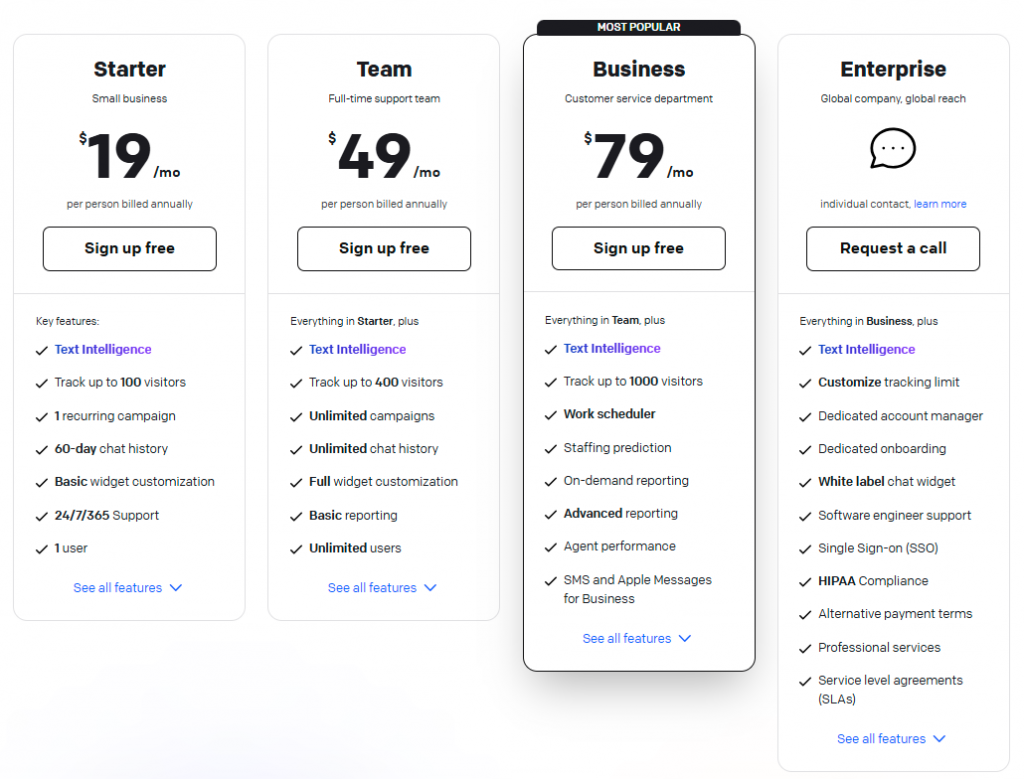
LiveChatAI is a powerful solution for businesses looking to provide efficient customer service and automate routine tasks. Its AI-powered features, multi-channel support, and seamless integration capabilities make it a strong alternative for businesses aiming to optimize their customer support experience.
8. HappyFox
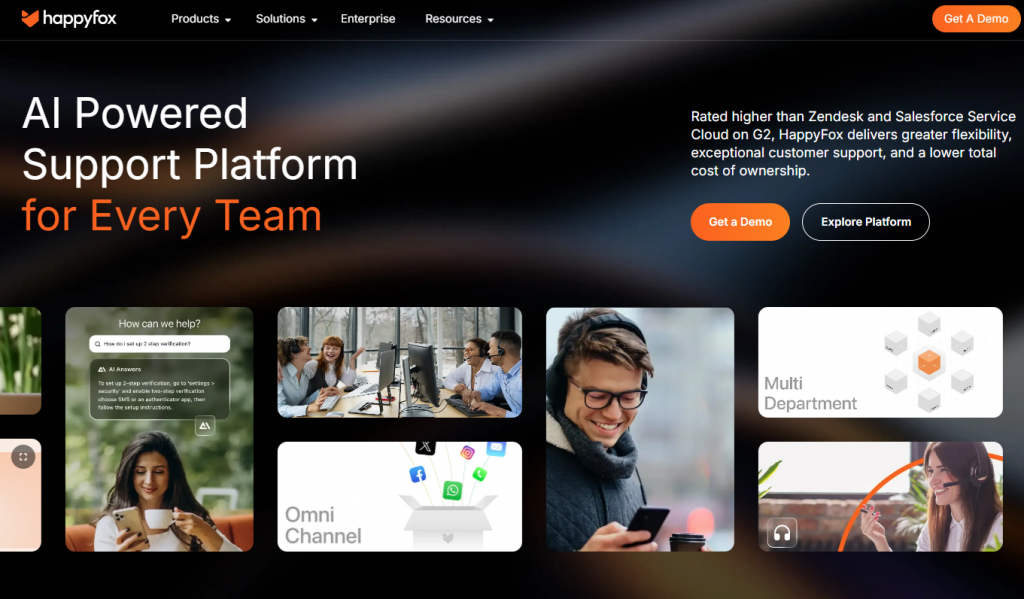
HappyFox is a help desk platform built for teams that manage IT support and internal service desk workflows.
It provides a structured ticketing system with automation to route, assign, and track requests across internal teams and customer-facing support channels.
HappyFox focuses on organized service management rather than conversational or AI-first support. It helps teams handle incidents, service requests, and internal operations with clear processes and reporting.
The platform includes features like self-service portals, workflow automation, and performance tracking, allowing teams to maintain visibility and control over support operations.
HappyFox is best suited for organizations that need structured, process-driven support for IT and internal services rather than real-time, AI-driven customer interaction.
Features:
- Ticketing system with automation and smart assignment rules
- Self-service portals for employees or customers
- CRM integrations to streamline customer data
- Slack integration for real-time collaboration
- Auto-tagging, reporting, and analytics for performance tracking
Pros:
- Strong for IT support and internal service desk workflows
- Automation and ticket assignment reduce manual work
- Integrates with Slack and other collaboration tools
- Provides reporting and analytics for operational oversight
Cons:
- Notifications can be delayed, affecting response times
- Ticket due dates may be inaccurate
- Smaller user base and fewer reviews compared with larger competitors
- Less suitable for teams needing advanced AI-first automation
Pricing:
- Starts at $39 per agent per month, with higher-tier plans up to $99 per agent per month for advanced automation, reporting, and multi-department support.
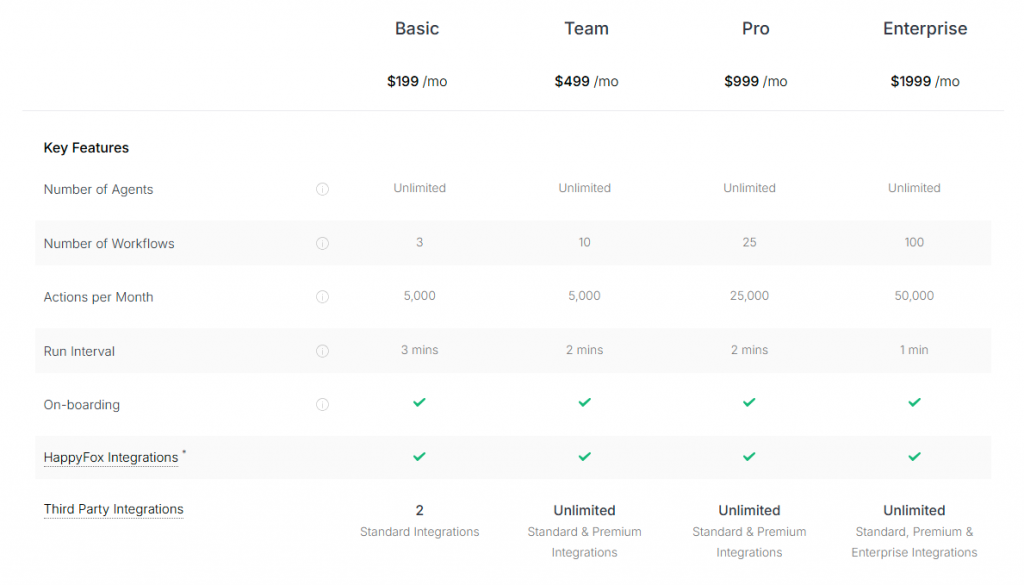
HappyFox is best for teams that need IT-focused help desk capabilities with automation, reporting, and integration options, particularly for internal support or IT service management.
Comparison Table :
| Tool | Best for | Starting price | AI approach | Tradeoff |
|---|---|---|---|---|
| YourGPT | Reducing tickets through AI-led resolution | From $39/month | Autonomous agents executing workflows across channels | Less legacy ecosystem compared to older platforms |
| Zendesk | Structured, large-scale support operations | From $19/agent/month | AI layered on top of ticketing workflows | Complex setup and higher total cost at scale |
| Intercom | Conversational, real-time customer engagement | From $29/seat/month + usage | AI agents for chat-first automation and routing | Costs increase quickly with scale and usage |
| Help Scout | Simple, low-overhead email support | Usage-based | Light AI for replies and summaries | Not built for automation-heavy workflows |
| Zoho Desk | Cost-conscious teams needing full feature depth | Region-based | AI features integrated within help desk workflows | Complex UI and setup overhead |
| Front | Team collaboration around conversations | From $25/seat/month | AI copilot supporting human workflows | Limited for ticket-heavy support environments |
| LiveChatAI | Chat-first automation and engagement | Custom / varies | AI chat automation for real-time support | Not a full help desk replacement |
| HappyFox | IT and internal service desk workflows | From $39/agent/month | Basic automation and reporting | Limited AI-first capabilities |
What to Look for in Competitors and Alternatives
Switching from Freshdesk should solve real problems, not just replace a tool. Before evaluating options, get clear on the criteria that separate useful alternatives from ones that only look good on paper.
- Performance & Features : Look for platforms with advanced ticketing, omnichannel support, AI-driven automation, and robust analytics. These determine how efficiently your team handles volume at scale, not just today but as your support operation grows.
- Ease of Use : A powerful platform is only as good as its adoption rate. Prioritize clean, intuitive interfaces that agents can learn quickly. Minimal training overhead reduces onboarding time and lowers the chance of errors when your team is under pressure.
- Customization & Integration : Your support tool doesn’t work in isolation. Choose platforms that offer flexible workflows, custom fields, and seamless integration with your CRM, project management tools, and other business-critical applications. The less context-switching required, the better your team performs.
- Pricing & Scalability : Look beyond the entry-level plan. Evaluate transparent per-agent pricing, feature gating across tiers, and whether the platform can scale without forcing a costly migration down the line. Hidden upgrade costs are one of the top reasons teams leave Freshdesk in the first place.
- Customer Support & Community : When something breaks, you need help fast. Prioritize vendors that offer 24/7 support, thorough documentation, and an active user community where real-world configurations and fixes are shared openly.
Choose a ticket-first alternative (Zendesk or Zoho Desk) if your main pain is operational complexity inside support. Choose an AI-first alternative (YourGPT or Intercom) if your main pain is volume, repetitive questions, slow response times, or channel sprawl.
Migration Checklist for Teams Leaving Freshdesk
Switching from Freshdesk is a workflow decision, not just a tool change. Be clear on what you want to fix before picking a new platform.
Answer these before you move:
- Which conversations should AI handle without agent involvement?
- Which channels will matter most in the next 12 months: email, chat, WhatsApp, social, phone, or internal tools?
- Do you need a better ticketing system, or fewer tickets overall?
- What content will power the system: help center articles, internal docs, macros, SOPs, or website pages?
- What defines success after 60 days: faster responses, lower ticket volume, higher CSAT, lower cost per resolution, or faster onboarding?
Also check:
- Who owns the migration internally?
- Which workflows need to be rebuilt or removed?
- Is your data and knowledge base clean enough to use?
Teams that get this right decide how support should work first, then choose a tool that fits. goals upfront make the transition faster, less disruptive, and more effective.
FAQs
What is actually the best Freshdesk alternative for my team?▼
It depends on what is not working right now. If your issue is managing tickets, tools like Zendesk or Zoho Desk may fit better. If your issue is too many incoming tickets, you need a solution that reduces volume rather than just organizing it.
How do I know if I should switch at all?▼
Evaluate your daily challenges. If your team faces repetitive queries, slow responses, or scattered communication channels, switching can help. If operations are mostly smooth, optimizing your current setup may be enough.
What is the difference between a help desk and an AI-first platform?▼
A help desk manages conversations through tickets, while an AI-first platform aims to resolve those conversations before they reach your team. The difference lies in how support is handled, not just features.
Will switching tools reduce ticket volume?▼
Not necessarily. Moving between help desks usually keeps volume the same. Ticket reduction happens when AI is used to resolve issues without human intervention.
Which tools are better if I want fewer tickets, not better tickets?▼
Look for platforms focused on automation and resolution. Tools like YourGPT or Intercom handle customer intent directly, unlike traditional systems that revolve around ticket queues.
What is the real cost difference between these tools?▼
The real cost is not just per-seat pricing. It includes how many issues are resolved without agents, time saved, and how many tools you can eliminate from your tech stack.
How hard is it to migrate from Freshdesk?▼
Migration difficulty depends on preparation. Clean data and clear workflows make the process straightforward. Most delays happen due to unclear processes rather than technical limitations.
What usually breaks during a migration?▼
Issues often arise from copying outdated workflows or using unreliable knowledge base content. Poor content quality can limit the effectiveness of any new system.
Can AI handle real customer issues or just basic questions?▼
AI can handle more than FAQs when properly configured. It works well for tasks like order tracking, account updates, and troubleshooting. Complex or sensitive issues still require human support.
Which option is better for enterprise teams?▼
Enterprise teams often need structure, reporting, and control, making traditional help desks a safer choice. However, adding an AI layer is essential if reducing ticket volume is a priority.
What is the biggest mistake teams make when switching?▼
The biggest mistake is choosing a tool before defining support workflows. Successful teams first decide how support should function, then select a platform that aligns with those needs.
How do I measure if the new tool is actually better?▼
Focus on outcomes such as response time, resolution time, ticket volume, cost per resolution, and customer satisfaction. If these metrics do not improve within a few months, adjustments are needed.
Conclusion
Selecting the right alternative to Freshdesk is essential for enhancing customer engagement and support.
The Top 8 Freshdesk Alternatives in 2026 include platforms with advanced features, ease of use, and extensive customization, enabling businesses to streamline workflows, optimize service delivery, and better engage with their customers.
These alternatives offer scalable solutions that cater to your business’s current and future needs, ensuring seamless integration with your existing tools and workflows.
Evaluate the platform that aligns best with your support goals, creates meaningful customer experiences, and drives higher satisfaction through efficient engagement and support.
Transform Your Customer Experience with Advanced AI chatbot
Join thousands of businesses transforming customer interactions with YourGPT AI
- ⚡️ 5-minute setup
- 🌐 Multi-lingual
- 🗣️ Voice Support
- 🔌 Omni-Channel Integration
No credit card required • Full access • Limited time offer
Leave a Reply