TL;DR
Chatwoot is a self-hosted support platform with a shared inbox and multi-channel coverage, but many teams outgrow it when they need stronger AI automation, easier scaling, and less operational overhead. This guide compares the top 7 Chatwoot alternatives for customer support in 2026.
Chatwoot is a customer engagement platform that brings live chat, email, WhatsApp, Instagram, Facebook Messenger, and other messaging channels into one shared inbox. Its self-hosting flexibility, built-in automation, and low-cost entry point make it a practical option for startups, small teams, and businesses that want more control without committing to expensive SaaS tools.
However, customer service demands have changed.
Support teams now expect more than a unified inbox and basic routing rules. They want AI that can resolve common issues, not just suggest replies or route conversations to agents. They also need platforms that scale cleanly, reduce operational overhead, and support more advanced workflows without adding engineering burden.
That is why many teams start exploring alternatives to Chatwoot.
In this guide, we compare the top 7 Chatwoot alternatives for customer support in 2026. We focus on platforms that offer stronger AI automation, better omnichannel support, more flexible workflows, and a more practical path to scaling support operations.
Limitations of Chatwoot
Chatwoot can work well for teams that want more control over their support stack and are comfortable managing the technical side themselves. But as support operations grow, many teams start running into practical limits around maintenance, AI capability, integrations, and enterprise readiness.
Here are the most common reasons businesses begin evaluating alternatives.
1. Self-Hosted Infrastructure Adds Ongoing Operational Work
One of Chatwoot’s biggest strengths is deployment flexibility. But that flexibility also creates responsibility.
Teams that self-host Chatwoot need to manage servers, databases, backups, updates, uptime, and security. That may be manageable early on, but it becomes more demanding as conversation volume grows and the support system becomes more business-critical.
For growing teams, infrastructure work often turns into a recurring operational cost that does not directly improve customer experience. Instead of focusing on support quality, internal resources get pulled into maintenance, monitoring, and troubleshooting.
2. Limited AI for More Complex Support Requests
Chatwoot includes an AI assistant for handling common questions, but its capabilities remain limited for more complex support work.
In practice, it works better as a lightweight assistant than a system that can resolve issues independently. When customers ask detailed, context-heavy questions or need actions completed across backend systems, human agents still need to step in.
For teams evaluating modern support platforms, this becomes a clear limitation. The AI can help reduce some repetitive work, but it does not offer the deeper automation, multi-step execution, or end-to-end issue resolution that many businesses now expect.
3. Setup and Changes Still Depend on Technical Resources
Chatwoot gives teams flexibility, but getting it fully set up and adapting it over time often requires technical comfort.
For many teams, that can become a limitation. Changes to workflows, integrations, routing logic, or automation settings may still depend on engineering support, especially when the setup is more customized. This slows iteration and makes it harder for support teams to manage and improve operations on their own.
As a result, Chatwoot can be harder to scale for businesses that want faster implementation and less technical dependency.
4. Custom Integrations Are Common and Require Developer Work
Chatwoot has pre-built integrations with Slack, Dialogflow, Linear, and others. But most real integrations (your CRM, billing system, internal API) need custom work. You’re writing webhooks, maintaining sync logic, and handling edge cases when APIs change.
The development of API integration is impossible without programming skills or the participation of specialist integrators. When Stripe updates their API, your custom integration stops working. You find out because tickets aren’t auto-closing anymore. Now you need engineering again. Maintaining these custom integrations consumes engineering time and creates technical debt.
Best for teams willing to invest in integration development.
5. Pricing Scales With Deployment Complexity
Chatwoot itself is free, but total cost of ownership is deceptive. A growing team typically pays for server infrastructure ($300-800 monthly), database backups and monitoring ($100-300), managed hosting services if you don’t want to maintain it ($500-1,500), and engineering time for maintenance and custom integrations (5-15 hours weekly).
By the time you reach 10,000 monthly conversations, you’re spending $1,000-2,500 monthly just to keep it running. AI assistant adds $200 monthly for higher response limits. Teams don’t see transparent, predictable costs the way commercial SaaS platforms offer. Budget surprises happen when infrastructure needs grow unexpectedly.
Best for teams with stable infrastructure costs and predictable growth patterns.
6. Limited Enterprise Features
Chatwoot lacks features that enterprise teams require: advanced permission models, audit logs, compliance certifications, dedicated support, and SLAs. Enterprise features like SSO for secure access, role-based permissions so junior reps can’t delete tickets, audit logs for compliance, API rate limits, and SLA rules don’t exist in Chatwoot.
For regulated industries or large organizations, these gaps are dealbreakers. You either build them yourself or accept that anyone with access can do anything. Custom development to add missing features becomes necessary, further increasing complexity and maintenance burden.
Best for small to mid-size teams not requiring enterprise compliance.
Quick Glance
| Platform name | Best for |
|---|---|
| YourGPT | Teams wanting AI agents that resolve support requests and execute real actions across channels |
| Intercom | SaaS companies focused on live chat, customer messaging, and AI-assisted support workflows |
| Zendesk | Large support teams needing structured ticketing systems with analytics and workflow automation |
| Freshchat | Support teams managing high chat volumes through messaging-first customer support |
| LiveAgent | Teams handling omnichannel support with ticketing, live chat, and call center features |
| Kommunicate | Businesses introducing chatbot automation with smooth human handoff |
| Gorgias | Ecommerce brands needing support tools tightly connected to order and store data |
7 Best Chatwoot Alternatives and Competitors (2026)
Chatwoot works well for self-reliant technical teams, but modern alternatives offer managed infrastructure, AI-driven automation, enterprise features, and simpler scaling. Below are seven platforms teams commonly evaluate instead.
1. YourGPT
Best for: Teams that want AI agents to automate support, sales, and operations by executing real actions across web chat and messaging channels.
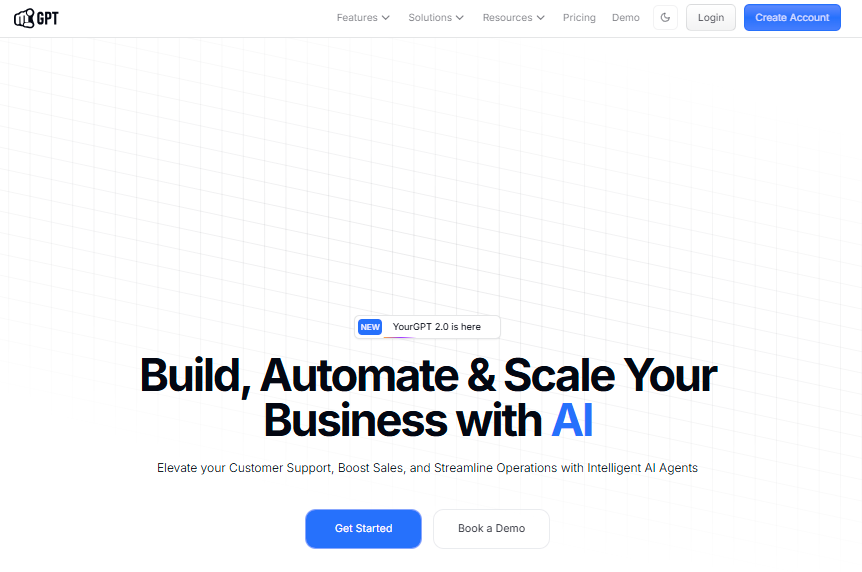
YourGPT is an AI-first platform designed to build and deploy autonomous AI agents across customer support, sales, and internal operations. Unlike traditional conversation management tools, YourGPT agents go far beyond answering questions they complete tasks, trigger workflows, check systems, process actions (like refunds or order updates), and resolve requests end-to-end, all within the same natural conversation.
Teams can quickly launch simple knowledge bots using the intuitive no-code builder, then scale to advanced, structured automation through the powerful AI Studio enabling complex workflows, deep system integrations, and multi-step resolutions without any infrastructure overhead or heavy coding.
Features:
- No-Code AI Agent Builder: Create intelligent agents using your knowledge base, website content, and FAQs. Deploy across channels instantly without coding.
- Autonomous Issue Resolution: Agents can check account status, process refunds, update orders, and escalate only when necessary. This reduces manual ticket handling.
- Omnichannel Deployment: Deploy once and run consistently across web chat, WhatsApp, Instagram, Slack, Telegram, email, and voice with unified context.
- Built-In Knowledge Integration: Train agents on internal documentation and customer-facing content with automatic updates and version control.
- Managed Infrastructure: No servers to manage, no databases to maintain. Everything runs on a cloud-native architecture with built-in scaling.
- Enterprise-Grade Automation: Handle complex workflows, multi-step actions, and conditional logic without custom code or infrastructure overhead.
- Analytics and Self-Improvement: Track resolution rates, deflection metrics, and performance. The platform learns continuously to improve accuracy.
Limitations:
- Less flexibility than open-source platforms for highly customized deployments.
- Requires trusting the vendor’s infrastructure management.
Pricing :
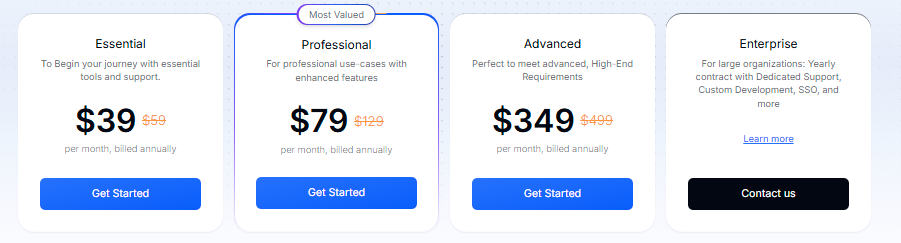
- Essential — $39/month for core chatbot and automation
- Professional — $79/month with advanced workflows and integrations
- Advanced — $349/month for teams with higher automation needs
- Enterprise — Custom pricing with SSO, dedicated support, and custom development
2. Intercom
Best for: Teams that prioritize real-time customer conversations through live chat and messaging while using AI to reduce repetitive support questions.
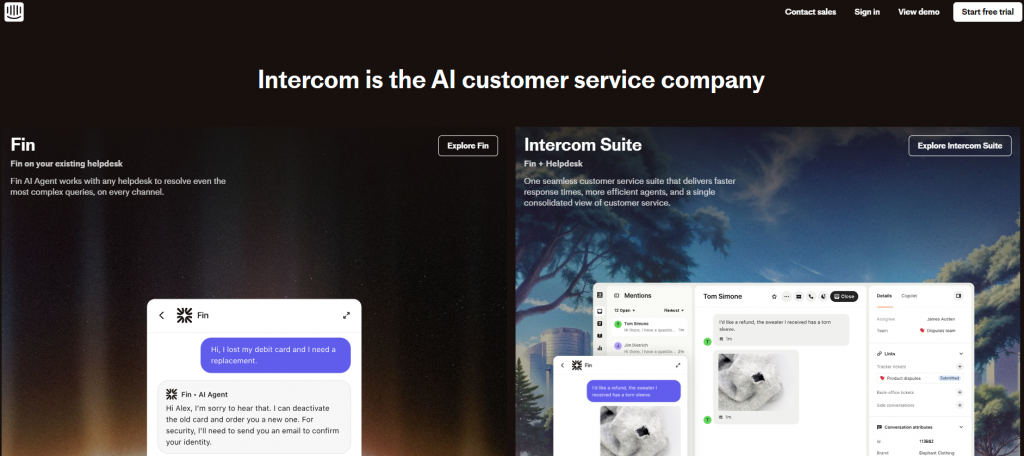
Intercom is a customer communication platform built around real-time chat, messaging, and help desk capabilities. It combines conversation management with AI-assisted automation, helping teams manage support interactions while reducing repetitive questions.
The platform brings together live chat, email, and in-app messaging in one workspace. It also includes tools for help center management, automated message routing, and customer onboarding.
Intercom’s AI mainly focuses on assisting agents and deflecting common support questions by suggesting answers or directing users to help articles.
Features:
- Unified Inbox: Manage chat, email, in-app messaging, and social conversations from one dashboard with assignment and collaboration tools.
- AI-Powered Bots and Automation: Use rule-based workflows to answer FAQs, route conversations, qualify leads, and collect information before handoff to agents.
- Customer Data Platform: View customer profiles, conversation history, and behavior context directly in conversations for personalized responses.
- Help Center and Knowledge Base: Create searchable self-service articles that integrate with chat for context-aware suggestions.
- Targeted Messaging: Send product announcements, help content, and proactive messages based on user behavior and lifecycle stage.
- Developer-Friendly APIs: Build custom integrations and extend functionality for specific use cases.
- Advanced Reporting: Track conversation metrics, agent performance, customer satisfaction, and revenue impact.
Limitations:
- Automation is primarily rule-based, not autonomous
- Pricing scales with conversation volume, making it expensive for high-traffic teams
- Limited ability to trigger complex backend actions without custom development
- Less suited for building fully independent AI agents
Pricing:
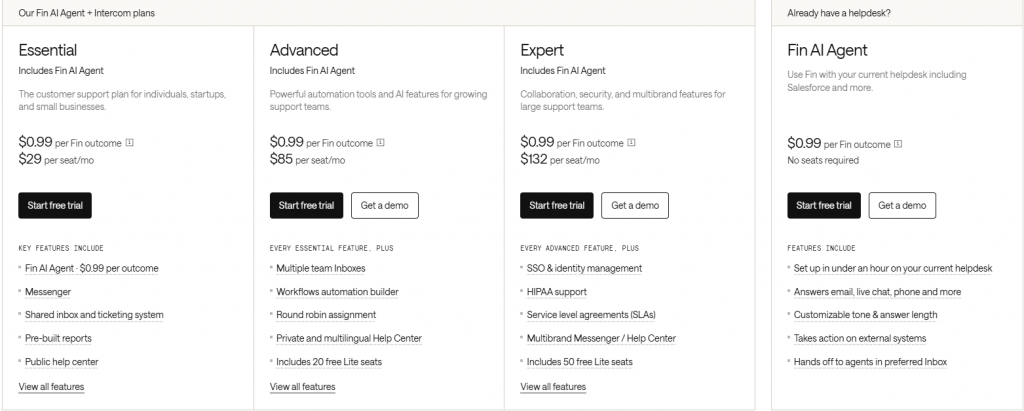
- Essential — $29/seat/month + $0.99 per Fin outcome
- Advanced — $85/seat/month + $0.99 per Fin outcome
- Expert — $132/seat/month + $0.99 per Fin outcome
- Fin AI Agent (Add-on) — $0.99 per outcome, no seat required
3. Zendesk
Best for: Teams managing structured customer support with ticketing across email, chat, phone, and social channels, with reporting and workflow control.
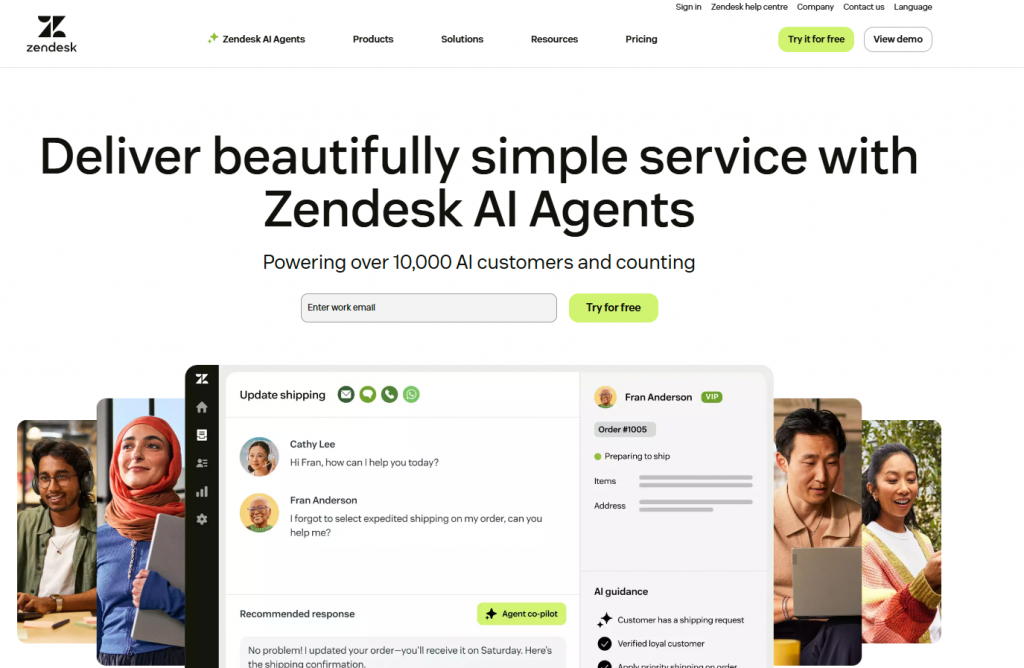
Zendesk is a feature-rich help desk platform that centralizes customer support across email, chat, phone, social media, and messaging apps. It is designed for teams that want a structured ticketing system with detailed agent tools, reporting, and integrations.
The platform organizes all customer interactions into tickets, allowing support teams to track, assign, and resolve issues efficiently. It also includes features such as a knowledge base, workflow automation, SLA management, and analytics dashboards to monitor support performance.
Many companies use Zendesk to manage large support operations where ticket tracking, team collaboration, and reporting are essential.
Features:
- Unified Ticketing System: Convert all customer interactions (email, chat, calls, social) into tickets managed from a single dashboard with assignment, prioritization, and SLA tracking.
- Live Chat and Messaging: Offer real-time support through website chat, WhatsApp, Facebook Messenger, Instagram, and other channels with agent routing and availability settings.
- Knowledge Base and Help Center: Create self-service articles and a branded help center that integrates with tickets to suggest relevant content during conversations.
- Automation and Rules Engine: Set up workflows to auto-assign tickets, escalate based on conditions, send notifications, and apply tags automatically without custom code.
- AI-Powered Suggestions: Zendesk AI suggests replies and automatically categorizes tickets, reducing typing time and routing delays for support agents.
- Advanced Reporting and Analytics: Track ticket volume, resolution times, agent performance, customer satisfaction, and support trends with customizable dashboards.
- Agent Tools and Productivity: Provide agents with macro shortcuts, canned responses, knowledge base search, and customer context to handle tickets faster.
Limitations:
- AI focuses on suggestions and routing, not autonomous issue resolution. Agents still handle most requests manually.
- Ticket-centric approach can feel limiting for omnichannel conversation management and branching logic.
- Setup and customization require touch points with multiple settings pages, triggers, macros, and conditions.
- Pricing scales with agent count and usage, making costs predictable but rigid as volume grows.
- Limited native support for complex backend actions or autonomous task completion.
Pricing:
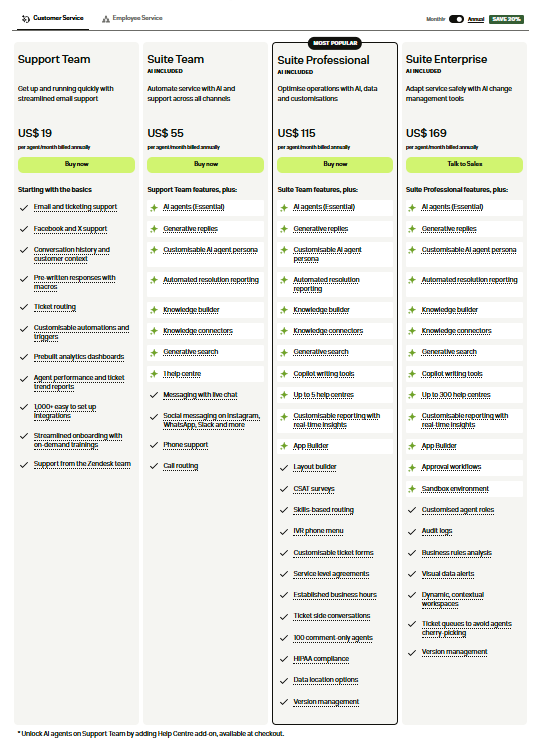
- Support Team — $19/agent/month for basic email and ticketing
- Suite Team — $55/agent/month with AI support and multi-channel features
- Suite Professional — $115/agent/month with advanced automation and customization
- Suite Enterprise — $169/agent/month with enterprise controls and scalability
4. Freshchat
Best for: Teams handling high-volume customer conversations via chat and messaging, using live chat and chatbot automation.
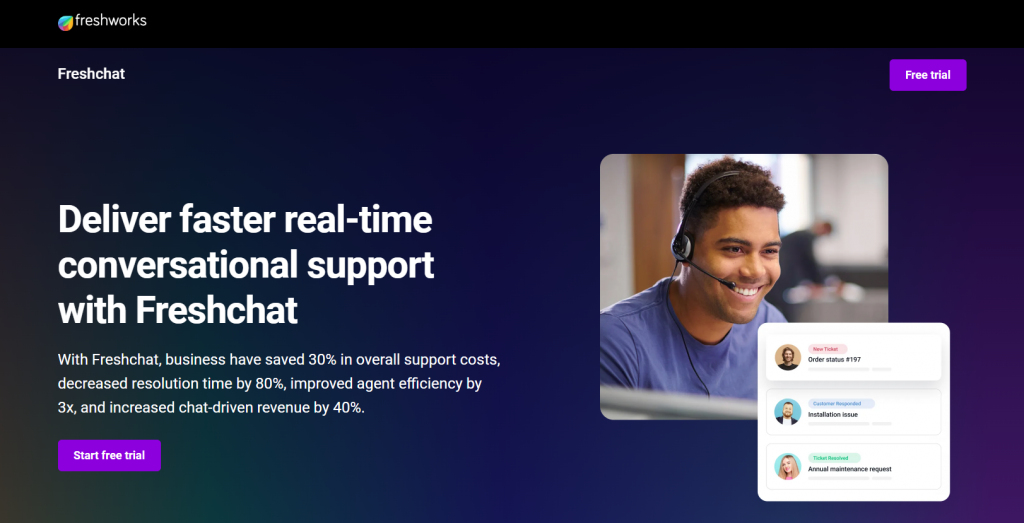
Freshchat is a conversational support platform that combines live chat, AI chatbots, and unified inbox management. It helps support teams manage large volumes of conversations across multiple channels while automating routine customer questions.
Unlike traditional ticketing systems, Freshchat focuses on messaging-style interactions. Conversations appear in a shared inbox where teams can collaborate, assign chats, and respond in real time. The platform also includes chatbot automation, predefined responses, and conversation routing to help teams handle repetitive requests more efficiently.
Businesses often use Freshchat when customer support happens mainly through chat and messaging channels.
Features:
- Unified Inbox for All Conversations: Manage web chat, mobile app messaging, WhatsApp, Facebook Messenger, and email in one shared workspace.
- AI-Powered Chatbots: Deploy bots to handle FAQs, lead qualification, and common support flows with NLP-based understanding.
- Rich Contextual Data: View customer profiles, conversation history, past issues, and behavioral data within conversations for faster resolution.
- Proactive Messaging: Trigger personalized messages based on user actions, page visits, or lifecycle events to prevent problems before they occur.
- Team Collaboration Tools: Internal notes, agent assignment, and team messaging to improve coordination and consistency.
- Performance Analytics: Monitor response times, resolution metrics, agent productivity, and customer satisfaction scores.
- Integrations: Connect with CRMs, help desks, analytics tools, and custom systems to sync customer data across your stack.
Limitations:
- Chatbots are primarily FAQ-focused, limited for complex workflows
- Limited support for autonomous backend actions
- Scaling to many channels can increase costs and operational complexity
- Automation still requires human involvement for most non-trivial requests
Pricing:
- Free — ₹0/month for basic live chat, email, and shared inbox (up to 10 agents)
- Growth — ₹1,499/agent/month with messaging channels and real-time dashboards
- Pro — ₹3,999/agent/month with advanced routing, dashboards, and SLA policies Enterprise — ₹6,399/agent/month with enhanced security, controls, and scalability

5. LiveAgent
Best for: teams handling high-volume support across email, chat, phone, and social channels with ticketing, SLA tracking, and performance insights.

LiveAgent is an omnichannel help desk platform built around ticket management, live chat, and call center capabilities. It combines email, chat, phone, and social media interactions within a centralized support environment.
Customer requests from different channels are converted into tickets, allowing teams to track conversations, assign responsibilities, and maintain organized support workflows. The platform also includes tools for SLA tracking, agent performance monitoring, automation rules, and a built-in knowledge base.
LiveAgent is commonly used by support teams that rely on a structured ticketing process and need to manage customer inquiries across multiple communication channels.
Features:
- Omnichannel Ticketing: Convert emails, live chat, social media, and calls into tickets managed from a unified dashboard.
- Live Chat with Skills-Based Routing: Offer chat support with intelligent routing based on agent skills, expertise, and availability.
- Call Center Integration: Handle inbound and outbound calls with built-in VoIP, call recording, and queue management.
- Automation Rules and Triggers: Set up rules for ticket assignment, priority escalation, notifications, and SLA tracking.
- Knowledge Base and Customer Portal: Create self-service articles and customer communities to reduce incoming ticket volume.
- Comprehensive Reporting: Track response times, resolution rates, agent performance, and SLA compliance metrics.
- Team Management: Assign tickets, manage workload, and monitor agent productivity from a centralized dashboard.
Limitations:
- Primarily ticket-focused, not conversation-driven
- Automation is rule-based and limited to workflow orchestration
- No native autonomous AI agents or backend action execution
- Steep learning curve for non-technical support teams
- Less flexible for teams moving toward AI-first support
Pricing:
- Small Business — $15/agent/month for basic ticketing, chat, and automation
- Medium Business — $29/agent/month with call center, reports, and SLA features
- Large Business — $49/agent/month with SSO, audit logs, and social integrations
- Enterprise — $69/agent/month with priority support and advanced enterprise features
6. Kommunicate
Best for: Teams using chatbot automation for common queries with seamless handoff to human agents when needed.
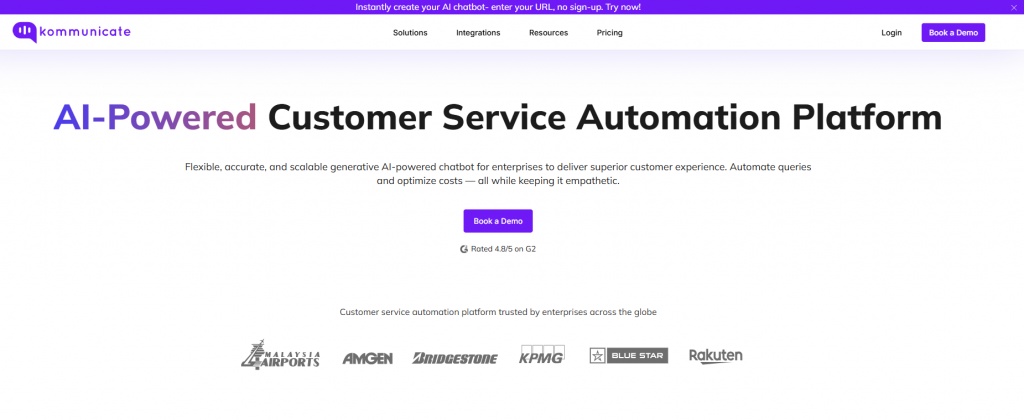
Kommunicate is a customer communication platform focused on AI chatbots with human handoff capabilities. It combines conversational automation with inbox management, allowing teams to automate routine inquiries while keeping human agents available for more complex issues.
The platform enables businesses to build chatbots that answer common questions, collect user information, and guide customers through basic support flows. When the request requires human assistance, conversations can be transferred directly to support agents without interrupting the customer experience.
Kommunicate is commonly used by teams that want to introduce chatbot automation while maintaining a hybrid support model where AI handles repetitive queries and agents manage more detailed customer requests.
Features:
- AI Chatbots with Natural Language: Deploy bots that understand customer intent using NLP and generative AI for more human-like conversations.
- Seamless Human Handoff: Chatbots automatically escalate to agents when needed, maintaining conversation context throughout the transition.
- Unified Conversation Inbox: Manage bot and human conversations from a single interface with assignment, tagging, and collaboration tools.
- Multi-Channel Support: Deploy chatbots across web, mobile apps, WhatsApp, Facebook Messenger, and other messaging platforms.
- Custom Bot Training: Train bots on your knowledge base, FAQs, and business processes to improve accuracy and consistency.
- Dialogflow and NLP Integration: Build sophisticated bots using Google Dialogflow and other NLP engines for advanced intent handling.
- Conversation Analytics: Track bot performance, handoff rates, resolution metrics, and agent productivity from a unified dashboard.
Limitations:
- Chatbots are primarily conversational, limited in taking backend actions
- Advanced customization depends on external NLP tools
- Complex multi-step workflows may still require human intervention
- Less suitable for replacing full omnichannel support systems
Pricing:
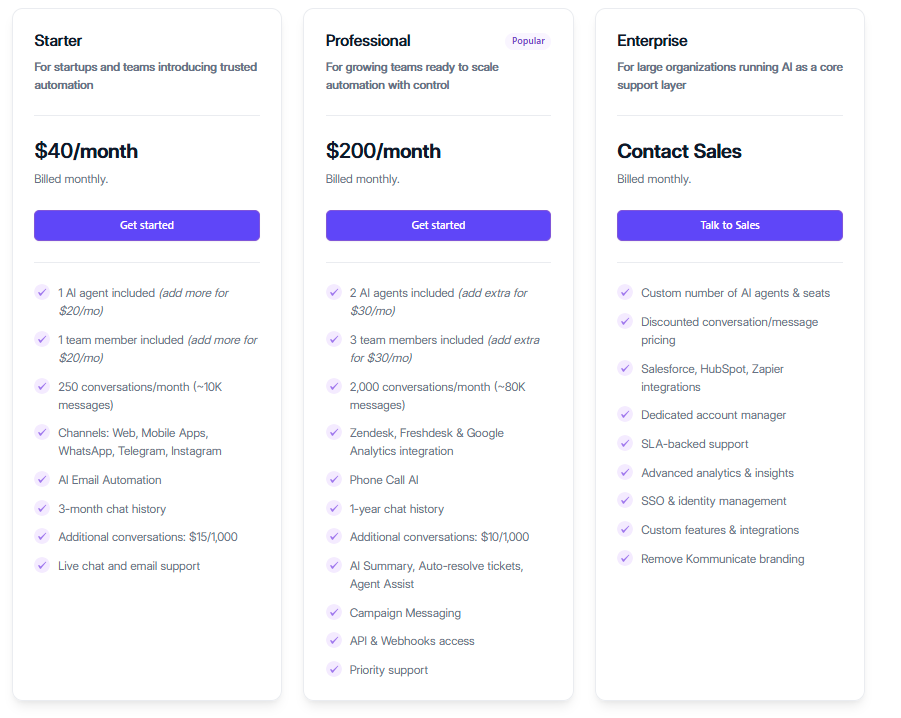
- Starter — $40/month for basic AI chatbot, automation, and multi-channel support
- Professional — $200/month with advanced automation, integrations, and analytics
- Enterprise — Custom pricing with SSO, dedicated support, and custom integrations
7. Gorgias
Best for: Ecommerce brands managing customer conversations with direct access to orders, refunds, and shipping within the support interface.
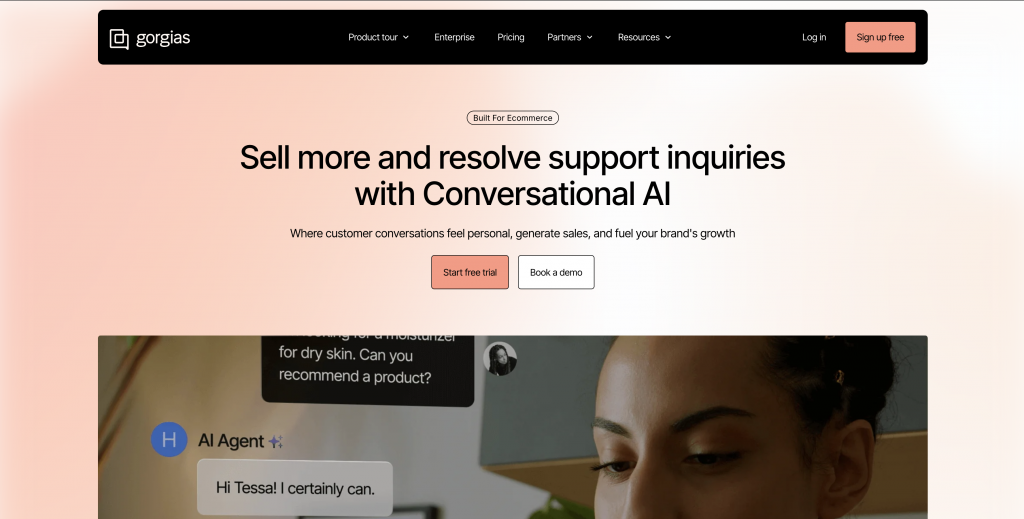
Gorgias is a customer support platform built specifically for eCommerce brands, particularly Shopify stores. It helps support teams manage customer conversations while keeping order and store data available during every interaction.
Instead of relying on a traditional help desk model, Gorgias connects directly with eCommerce platforms so agents can view order history, shipping details, and customer activity while responding to messages. This context allows teams to answer questions faster and perform actions such as order updates, cancellations, or refunds without switching tools.
Many eCommerce support teams rely on Gorgias when handling frequent order inquiries. By keeping customer conversations and store operations connected in one interface, agents can resolve issues faster and maintain consistent support across channels.
Features:
- Unified Support Inbox: Manage email, live chat, Instagram, Facebook, TikTok, and other channels from one dashboard.
- Deep eCommerce Integrations: Access order details, customer history, shipping status, and refund information directly in conversations without switching tools.
- AI-Assisted Replies: Use AI to suggest responses for common eCommerce questions, reducing response time and improving consistency.
- Macros and Automations: Create saved replies and automation rules for repetitive issues like refunds, order status, and shipping inquiries.
- Live Chat and Social Messaging: Support customers on channels where eCommerce conversations naturally happen.
- Performance Analytics: Track ticket volume, response times, agent productivity, and revenue impact of support interactions.
- Customer Context: View complete customer history, past orders, returns, and interactions in a single timeline.
Limitations:
- Primarily designed for eCommerce, less suitable for other industries
- Automation is agent-assisted rather than fully autonomous
- Limited ability to trigger complex backend workflows beyond basic actions
- Costs scale with ticket volume and store growth
Pricing:
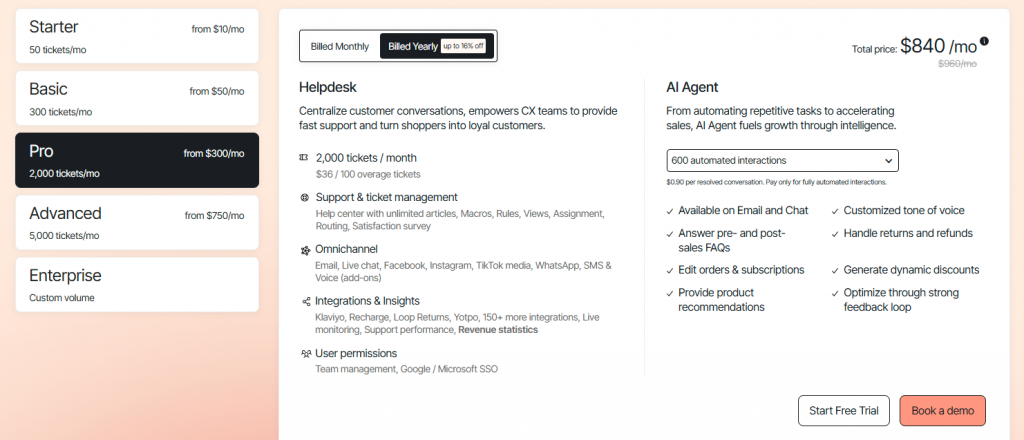
- Starter — from $10/month for up to 50 tickets
- Basic — from $50/month for growing support teams
- Pro — from $300/month for high-volume automation and support
- Advanced — from $750/month with deeper automation and integrations
- Enterprise — custom pricing for large-scale support needs
How to Choose the Right Alternative
Most teams regret their platform choice around the six-month mark. Not because the tool was bad, but because they evaluated the wrong things. These five factors usually determine whether an AI support platform actually improves operations.
1. Remove Infrastructure Overhead
Teams moving away from self-hosted systems usually want to eliminate the operational work required to maintain infrastructure. Servers, databases, backups, scaling, and security updates consume engineering time every month. A fully managed platform removes these responsibilities so teams can focus on improving support operations instead of maintaining systems.
2. Choose AI That Executes Tasks
Not all AI support platforms operate the same way. Some only generate responses, while others can perform actions such as retrieving order details, updating accounts, or triggering workflows. Platforms capable of executing tasks reduce ticket volume and shorten resolution time.
3. Enable Support Teams to Manage It
If every update requires engineering support, the platform becomes an operational bottleneck. Support teams should be able to update knowledge sources, adjust workflows, and refine automation without relying on developers. Platforms with visual configuration tools allow support teams to manage automation directly.
4. Ensure Consistent Multi-Channel Support
Customers contact businesses through website chat, messaging apps, email, and social platforms. AI systems should maintain consistent behavior across all channels. Platforms built with unified conversation logic allow teams to train once and deploy everywhere while preserving conversation context.
5. Evaluate Total Cost, Not Just Price
Free software often appears cheaper but introduces hidden operational costs such as infrastructure hosting and engineering maintenance. Managed platforms replace these hidden costs with predictable pricing while removing operational responsibilities. When teams evaluate total cost of ownership, managed platforms often become the more practical option.
FAQ
What is Chatwoot used for?▼
Chatwoot is a customer support platform that brings conversations from channels like live chat, email, WhatsApp, Instagram, Facebook Messenger, and Telegram into one shared inbox so teams can manage and reply to customers from a single place.
What challenges do teams face with Chatwoot?▼
Many teams struggle with server maintenance, updates, and scaling when self-hosting. Others mention limited automation, basic reporting, and occasional UI or connectivity issues.
Why do businesses look for Chatwoot alternatives?▼
As support volume grows, maintaining infrastructure and handling repetitive tickets becomes time-consuming. Many teams switch to tools that offer stronger automation and easier scalability.
How are modern alternatives different from Chatwoot?▼
Many newer platforms focus on AI-driven support that can automatically resolve routine questions, maintain context across channels, and reduce the number of tickets agents must handle.
What features should a good Chatwoot alternative have?▼
Look for strong automation or AI, omnichannel messaging, easy integrations with CRM or e-commerce tools, clear analytics, and simple setup without infrastructure management.
Can AI actually reduce support tickets?▼
Yes. AI support systems can automatically answer common questions, retrieve customer data, and resolve routine requests before they reach a human agent.
Why is omnichannel support important?▼
Customers often switch between channels like email, WhatsApp, and web chat. Omnichannel platforms keep conversation history and context so support remains consistent.
What are the best platforms to consider as Chatwoot alternatives?▼
Popular alternatives include AI-first customer support platforms, modern omnichannel helpdesks, and tools that integrate deeply with CRM or e-commerce systems while providing stronger automation and analytics.
When should a team consider moving away from Chatwoot?▼
If server management, limited automation, or weak analytics start slowing down support operations, it may be time to switch to a more scalable platform.
Is migrating from Chatwoot difficult?▼
Most modern support platforms offer tools to import contacts, conversations, and knowledge bases, making the transition relatively straightforward.
Conclusion
Most teams turn to Chatwoot alternatives for the same core frustrations. Self-hosting maintenance eats up engineering time, AI never advances beyond basic suggestions, reporting stays too shallow to guide real decisions, and UI or performance issues make daily work feel clunky. Chatwoot remains a good fit for small, technical teams that value open-source control and can handle the ongoing upkeep.
The platforms in this blog take a different path. Instead of routing every message to a shared inbox, they resolve routine questions automatically before they become full conversations. This reduces workload while keeping support consistent and context-rich across WhatsApp, Instagram DM, Telegram, email, web chat, voice, and more.
Tools like YourGPT lead with true AI resolution, handling repetitive requests with actions and closures so agents focus only on complex, high-value cases. These options typically offer easier setup, built-in integrations, predictable pricing, and AI that improves with every use.
When comparing alternatives, the real difference shows in daily results: fewer repeat questions, seamless channel experiences, less agent triage, and a shift from reactive to proactive support. The key question is: does the platform just manage incoming volume better, or does it actively eliminate most of it?
The right choice now lets your support scale smoothly with your business. Run a trial with your real queries and track the outcomes: resolution rate, deflection, time saved, and CSAT lift. The platform delivering the clearest gains will give your team lasting efficiency and measurable value.
Automate Customer Support Without Managing Servers
Train YourGPT on your support docs, deploy across web and messaging channels, and resolve customer issues automatically without infrastructure overhead.
No credit card required • 7-day trial • Setup in minutes
Leave a Reply